
Best Practices for Cloud Backup in SaaS Applications

Protecting SaaS data with cloud backups is essential to prevent data loss, comply with regulations, and ensure quick recovery. SaaS providers operate under a shared responsibility model, meaning they secure the platform, but you are responsible for protecting your data. Without a proper backup strategy, risks like accidental deletions, ransomware, or account breaches could result in downtime, permanent loss, and hefty compliance fines.
To safeguard your data effectively:
- Follow the 3-2-1 Rule: Keep 3 copies of your data, store them in 2 different locations, and ensure 1 is offsite.
- Automate Backups: Schedule backups frequently based on your Recovery Point Objective (RPO) and Recovery Time Objective (RTO).
- Use Encryption and Immutable Storage: Encrypt data in transit and at rest, and lock backups to prevent tampering.
- Practice Regular Testing: Test backups monthly and run full recovery drills quarterly to ensure reliability.
- Control Access: Use role-based access control (RBAC), multi-factor authentication (MFA), and IP whitelisting to secure backup operations.
Providers like Serverion offer reliable infrastructure for SaaS backups, including VPS and Dedicated Server options with features like encrypted storage, geographic redundancy, and DDoS protection. These solutions help meet performance needs, compliance requirements, and recovery targets.
Key takeaway: A strong cloud backup plan minimizes risks, ensures compliance, and supports rapid recovery to keep your business running smoothly.
SaaS Data Risks and Backup Basics
Common SaaS Data Risks
Human error is the top culprit behind SaaS data loss, responsible for over half of such incidents in many cases. Mistakes like accidental deletions, faulty data imports, or misconfigured integrations can wipe out records in seconds. Additionally, a compromised admin account or a disgruntled employee can wreak havoc by deleting emails, CRM entries, or project files. Phishing attacks and account takeovers add to the chaos, allowing attackers to perform actions that seem legitimate, bypassing built-in security measures like recycle bins and alerts.
Statistics reveal that 74% of organizations suffered from SaaS data loss within a single year. The causes range from accidental deletions and security breaches to SaaS platform outages. Ransomware attacks are becoming more sophisticated, targeting SaaS platforms directly. Attackers use stolen credentials to encrypt synchronized files in services like Microsoft 365 or Google Workspace or even mass-delete data across multiple applications. Sync errors and integration glitches can spread corrupted data across connected systems in no time, impacting CRMs, ticketing tools, and collaboration platforms. Even though rare, SaaS vendor outages or data corruption issues can affect multiple customers simultaneously, leaving businesses without access to their critical data.
These risks highlight why having a solid backup strategy is non-negotiable.
Cloud Backup Fundamentals
At the heart of effective cloud backup lies data redundancy. Following the 3-2-1 rule is a reliable approach: keep three copies of your data, store them in at least two different locations, and ensure one copy is offsite. For SaaS applications, this typically means having production data in the SaaS app itself, a primary backup in a separate cloud account or region, and an additional long-term copy stored elsewhere. This setup minimizes single points of failure and ensures recoverability, even if one backup source is compromised.
Backup frequency should align with your business’s tolerance for data loss. This is where Recovery Point Objective (RPO) and Recovery Time Objective (RTO) come into play. RPO defines the maximum amount of data loss acceptable in terms of time, while RTO determines how quickly data needs to be restored after an incident. For critical applications like CRM or email, many businesses aim for RPOs of just a few hours or less, which often requires multiple backups throughout the day. Less essential systems may only need daily backups and longer RPOs.
Modern SaaS backup tools offer flexible recovery options, ranging from item-level and bulk recovery to site-level, tenant-level, and point-in-time restores, catering to various recovery scenarios.
Storage reliability is another crucial aspect. Choose backup storage that guarantees high durability SLAs (some hyperscale object storage services promise 99.999999999% durability), offers cross-region replication, and includes immutable storage options to prevent changes or deletions during a set retention period. Providers like Serverion, which operate across multiple global data centers with robust security and reliability measures, can enhance redundancy and availability for U.S.-based SaaS deployments. Additionally, using encryption both in transit and at rest, along with strict access controls, ensures your backup data stays secure from unauthorized access or cyberattacks.
Cloud Backup Best Practices for SaaS Applications
Apply the 3-2-1 Backup Rule
Stick to the 3-2-1 rule: keep three copies of your data, use two different storage types, and ensure one copy is stored offsite to comply with U.S. data residency rules. If you’re managing regulated data under HIPAA, SOX, or state privacy laws, make sure your offsite backup remains in U.S.-based regions. Start by mapping all critical SaaS datasets, then choose a backup platform that supports multi-cloud storage. Set up policies to store primary backups in one cloud region and archive copies in another region or provider. Ensure the storage types differ – for example, use block storage for one and object storage with immutability features for the other. This layered approach strengthens your recovery plan, making it easier to bounce back quickly in SaaS environments.
Automate Backups with Detailed Scheduling
Automation is key to ensuring backups happen consistently and on time. Use policy-based scheduling to avoid human error and maintain regular data captures. A dedicated SaaS backup solution lets you automate backups at least daily for standard applications and as frequently as every 15 to 60 minutes for critical data. Schedule these backups during off-peak U.S. business hours to reduce any impact on performance.
Define clear RPO (Recovery Point Objective) and RTO (Recovery Time Objective) targets for each application. For instance, a financial services firm might set a 15-minute RPO and a one-hour RTO for CRM data, while HR systems might have a four-hour RPO and a 24-hour RTO. These targets determine how often backups are taken and how long they’re retained. For example, you might keep hourly backups for seven days, daily backups for 30 days, and monthly backups for a year. Use incremental backups to save on bandwidth and storage costs, and enable on-demand backups for high-risk changes. Features like point-in-time recovery allow you to restore data to specific timestamps, which is especially useful for recovering from accidental deletions or ransomware attacks.
Protect Data with Encryption and Immutable Storage
Secure your backups by encrypting data both in transit (using TLS) and at rest (with AES-256). Make sure all data transfers use HTTPS, and apply server-side encryption to backup repositories, object storage buckets, and databases.
To add another layer of security, use immutable storage. This type of storage ensures that backup data cannot be altered or deleted during a set retention period, safeguarding it from ransomware, insider threats, or accidental deletions. Many cloud providers offer WORM (Write Once, Read Many) object storage, which locks data and prevents changes via APIs until the retention period ends. Store immutable backups in a separate account and region for 30 to 90 days, and keep long-term copies in a different subscription or project. This separation ensures that production credentials and permissions cannot directly access your backup data, making it far more resilient against advanced threats. Together, these measures reinforce a strong recovery strategy for SaaS applications.
What Are Best Practices For SaaS Data Backup?
sbb-itb-59e1987
Security and Data Retention Strategies
When it comes to safeguarding your data, securing access and managing retention are just as important as having solid backup procedures. This requires strict controls and continuous oversight.
Control Access with IAM, MFA, and IP Whitelisting
Role-based access control (RBAC) is a key step to ensure only the right people have access to critical backup operations. By defining specific roles – like backup admin, restore operator, and auditor – you can limit who can modify policies, restore data, or delete backups. Use granular IAM policies to restrict high-risk actions, such as changing retention settings or exporting data, to a small, vetted group. Regularly audit permissions and remove inactive accounts to keep access lists tidy.
Multi-factor authentication (MFA) is non-negotiable for privileged backup roles. By integrating your backup platform with an identity provider that supports SAML or OAuth, you can enforce MFA at the identity provider level. This ensures every login to backup consoles or APIs requires an additional authentication factor. Make MFA mandatory for all privileged accounts, including emergency "break-glass" accounts and remote access.
IP whitelisting provides an additional layer of security by limiting access to backup management consoles to trusted IP ranges – such as those from corporate offices, VPN endpoints, or specific U.S.-based data centers. For remote or distributed teams, route admin access through a company VPN or zero-trust gateway with fixed egress IPs. Be sure to document and periodically review IP exceptions to maintain control. These measures lay the groundwork for the isolation and monitoring strategies discussed next.
Use Air-Gapping and Long-Term Retention Policies
Air-gapping is a powerful method to protect your backups by isolating at least one copy from direct network access or the primary IAM domain. This makes it significantly harder for ransomware or compromised accounts to tamper with your data. A logical air gap might involve storing backups in a separate cloud account or project with distinct IAM settings and no direct logins. For those requiring physical separation, exporting critical SaaS backup snapshots to encrypted removable storage and keeping them offsite is another option.
Pair air-gapping with immutable storage to create a robust defense. Even if attackers gain access to production systems, they won’t be able to encrypt or delete backup copies that are locked for a set period – whether 30, 90, or 365 days – based on your risk tolerance or compliance requirements. Implement tiered retention strategies: recent backups (30–90 days) for quick recovery, medium-term storage (1–2 years), and long-term archives (3–7+ years). Match each dataset to its specific regulatory requirements – for example, financial data in the U.S. might need to be retained for seven years, while general collaboration data could require only one to three years. Use lifecycle policies to automatically move older backups to cost-effective storage tiers and delete them once their retention period ends.
Test and Monitor Backups Regularly
A backup strategy is only as good as its execution, which is why regular testing and monitoring are critical. Test your backups monthly using automated runbooks, and conduct full recovery drills quarterly. Log each test and measure results against your recovery time objectives (RTO) and recovery point objectives (RPO). Any failures or delays should trigger thorough reviews and configuration adjustments. For U.S.-based organizations, align your testing schedule with audit cycles or SOC 2 requirements.
Enable continuous monitoring to detect and respond to potential issues. Set up alerts for failed jobs, unusual restore activity, mass deletions, or sudden changes in backup size – red flags that could indicate ransomware or data theft. Forward backup logs to a central SIEM for integrated threat analysis. Define clear runbooks so your SOC analysts and backup admins know how to respond when alarms go off. Be prepared to provide evidence during audits, such as architecture diagrams, IAM policies, MFA enforcement records, retention policies, and logs of successful backups and restore tests.
Providers like Serverion offer solutions to enhance your SaaS backup strategy. With their dedicated servers, VPS, and colocation options in global data centers, you can host isolated backup repositories that are logically or physically separated from production systems. By using Serverion’s infrastructure – featuring strict IAM, network segmentation, and IP allow listing – you can build air-gapped or semi-air-gapped setups and store long-term encrypted backups securely. Serverion also offers managed services, DNS hosting, and SSL solutions, which simplify secure connectivity and certificate management for backup endpoints. For U.S.-based companies needing compliance-driven storage, their colocation services make it easier to maintain control over physical backup media and implement hybrid on-premises/cloud retention strategies.
Using Serverion Hosting for SaaS Cloud Backup
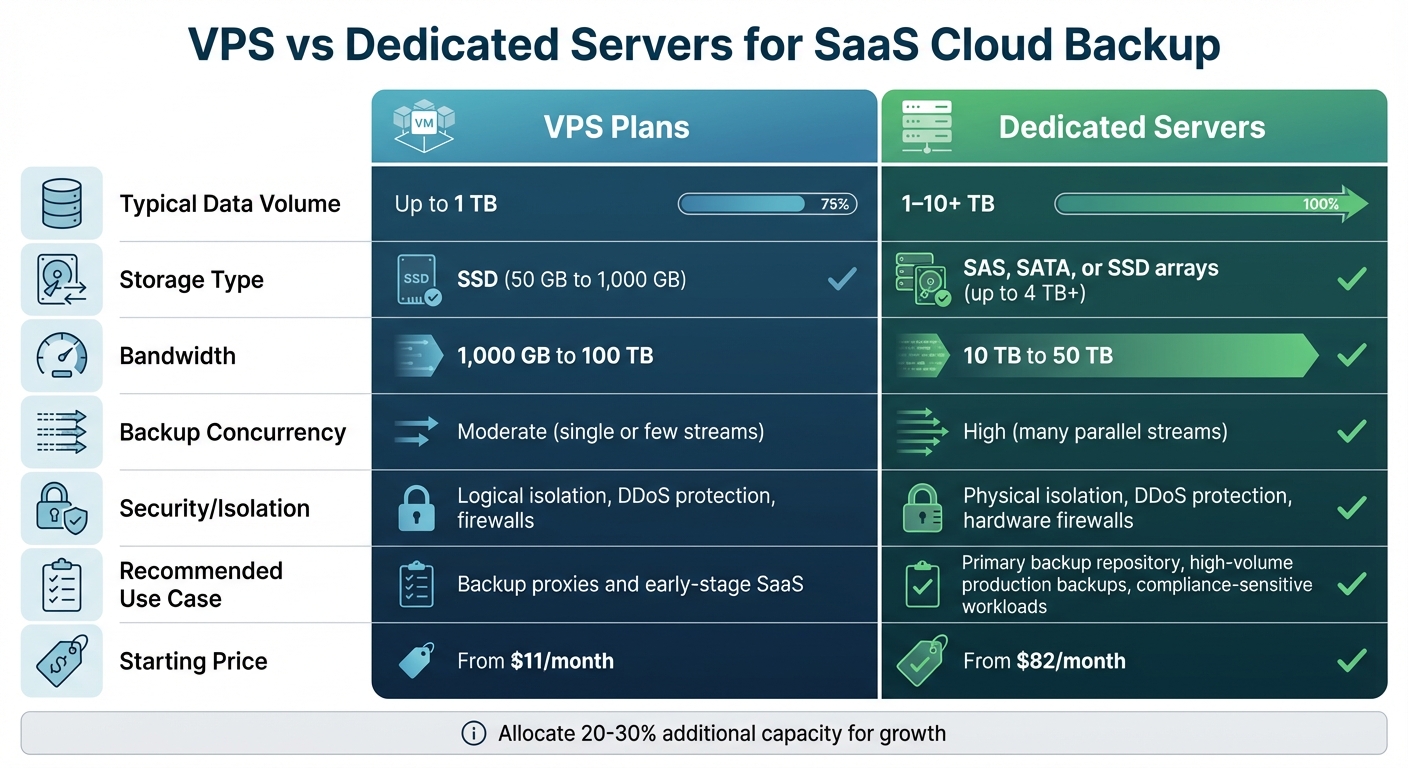
VPS vs Dedicated Servers for SaaS Cloud Backup: Feature Comparison
A strong SaaS backup strategy needs reliable infrastructure and well-defined policies. Serverion’s VPS and Dedicated Server options provide a dependable foundation for scalable cloud backup solutions. Let’s break down how these options can improve backup performance and meet demanding recovery requirements.
VPS Instances are a great choice for small- to mid-sized SaaS applications that need flexible and budget-friendly backup storage. If you’re dealing with several terabytes of multi-tenant data, a VPS can serve as the hub for your backup repository, management software, and any related services. With full root access and SSD performance, these instances support fast incremental backups. VPS plans also align with the 3-2-1 backup rule by allowing you to host primary and replicated copies in separate Serverion data centers.
Dedicated Servers, on the other hand, are designed for high-performance needs. They offer single-tenant hardware with dedicated CPU, RAM, and disk resources, making them ideal for handling large data volumes, high-throughput backups, and workloads with strict compliance requirements. For SaaS providers managing hundreds of gigabytes – or even terabytes – of daily data changes, dedicated servers ensure consistent performance. They also enhance security by enabling logical air gaps. For instance, you can store your backup repository on a separate server with unique credentials and IP whitelisting, reducing the impact of potential credential breaches. This setup supports advanced strategies like air-gapped and immutable storage.
Serverion also provides DDoS protection capable of mitigating attacks up to 4 Tbps, ensuring backup endpoints remain accessible during scheduled backups or restores. SSD storage enhances I/O throughput and minimizes latency, speeding up backup ingestion, deduplication, and restoration processes. This allows for shorter backup windows and tighter Recovery Point Objectives (RPOs). With VPS plans offering up to 100 TB of bandwidth and Dedicated Servers supporting up to 50 TB, you can run parallel backup streams across multiple tenants, making aggressive RPOs – like every 15 minutes – and faster Recovery Time Objectives (RTOs) achievable, even during large-scale restores.
With 37 data center locations spread across the US, EU, and Asia, Serverion makes it easy to distribute backup copies across regions. This geographic diversity strengthens disaster recovery efforts and ensures compliance with data residency requirements. For US-based SaaS providers, Serverion offers the flexibility to keep data within the country while maintaining low-latency access for backups and restores. Additionally, all infrastructure benefits from 24/7/365 monitoring, robust firewalls, and encrypted storage environments with up-to-date security patches, protecting your data from both external and internal threats.
Selecting the Right Serverion Plan for Your Backup Needs
Choosing between a VPS and a Dedicated Server depends on your backup requirements, including the size of your data, daily changes, retention period, and performance needs. Start by estimating your raw backup capacity, factoring in growth and overhead for features like deduplication.
For smaller SaaS applications with moderate daily changes and shorter retention periods (3–6 months), high-storage VPS plans are a cost-effective option. These plans offer sufficient SSD capacity and CPU power to handle compression and encryption for a few terabytes of data.
For larger applications with high transaction volumes, strict RPOs, and multi-year retention needs, Dedicated Servers are the better choice. They provide more RAM, CPU, and multi-disk arrays to handle numerous concurrent backup streams and long-term storage.
| Feature | VPS Plans | Dedicated Servers |
|---|---|---|
| Typical Data Volume | Up to 1 TB | 1–10+ TB |
| Storage Type | SSD (50 GB to 1,000 GB) | SAS, SATA, or SSD arrays (up to 4 TB+) |
| Bandwidth | 1,000 GB to 100 TB | 10 TB to 50 TB |
| Backup Concurrency | Moderate (single or few streams) | High (many parallel streams) |
| Security/Isolation | Logical isolation, DDoS protection, firewalls | Physical isolation, DDoS protection, hardware firewalls |
| Recommended Use Case | Backup proxies and early-stage SaaS | Primary backup repository, high-volume production backups, compliance-sensitive workloads |
| Starting Price | From $11/month | From $82/month |
When planning, allocate an additional 20–30% capacity to account for growth, logs, and testing. Also, consider future needs like analytics or legal holds, which could increase data storage requirements. To streamline operations, use orchestration tools to automatically replicate backup sets between Serverion data centers, ensuring consistent RPOs and retention policies across all locations without manual effort.
Conclusion
Safeguard your SaaS data with a combination of redundancy, encryption, and automation. By focusing on core security measures like encryption, immutability, and isolation, you can effectively mitigate threats. To keep pace with growing data volumes, integrate automation, conduct regular testing, and maintain continuous monitoring. Together, these practices create a solid backup system that ensures smooth, uninterrupted operations.
Serverion offers a powerful infrastructure designed for continuous backup availability and quick recovery. With a global network of 37 data centers, they provide geographic redundancy for offsite backups. All data resides in an encrypted environment, shielded by hardware and software firewalls, and monitored round the clock.
Whether you need VPS or dedicated servers, Serverion delivers solutions tailored to your backup scale and performance requirements. Enjoy full root access to customize your backup software, benefit from multiple daily snapshots, and leverage bandwidth options up to 100 TB to meet demanding RPO targets. This blend of security, performance, and global reach allows you to follow industry best practices without sacrificing reliability or overspending.
FAQs
What is the 3-2-1 backup strategy, and why is it essential for SaaS applications?
The 3-2-1 backup strategy is a well-known method for protecting data. Here’s how it works: you keep three copies of your data, store them on two different types of media, and ensure that at least one copy is stored offsite.
For businesses relying on SaaS applications, this approach is especially important. It helps create data redundancy and shields against risks like hardware malfunctions, cyberattacks, or even natural disasters. By implementing this strategy, companies can minimize the chances of losing critical data and ensure their systems remain dependable and secure.
How does automation improve cloud backups for SaaS applications?
Automation streamlines cloud backups for SaaS applications by taking over tasks like scheduling, monitoring, and resource allocation. This hands-free approach minimizes the need for constant manual oversight, reducing the risk of human error and ensuring backups are completed consistently and on time.
With automated monitoring and alert systems in place, potential problems can be flagged and addressed quickly, helping to prevent downtime and data loss. On top of that, automation helps ensure compliance by adhering to established policies and standards while fine-tuning system performance to make better use of resources.
What are the most effective ways to secure SaaS backup data?
To keep your SaaS backup data safe, you should prioritize encryption to safeguard data both while it’s being transmitted and when it’s stored. Adding firewalls and enforcing strict access controls can block unauthorized access effectively. Staying on top of security patches is another key step to shield your system from potential vulnerabilities.
It’s also smart to set up frequent backups and snapshots to ensure data integrity and allow for fast recovery when necessary. Pair this with continuous monitoring for suspicious activity and access to 24/7 technical support to add an extra layer of security and reassurance.







