

LDAP Synchronization Techniques for Hybrid Systems

LDAP synchronization aligns user identities between on-premises directories and cloud services, enabling seamless access across systems. It simplifies hybrid IT setups by syncing changes like passwords or group memberships automatically. However, challenges like data inconsistencies, schema mismatches, and scalability issues can complicate the process. This article explores three key synchronization methods:
- Microsoft Entra Connect: Best for Microsoft-centric environments, offering automated syncing and delta updates. Requires Windows Server 2016 or newer.
- OpenShift LDAP Group Sync: Ideal for Kubernetes clusters, allowing precise control over group syncing through YAML configurations.
- Active Directory-Based LDAP Sync: Optimized for Windows domains, focusing on secure replication and structured management.
Each method has its strengths and limitations. For example, Microsoft Entra Connect is easy to set up but demands regular updates, while OpenShift LDAP is flexible but requires technical expertise. Active Directory sync integrates well with Windows but has security risks like clear-text password storage.
As hybrid systems evolve, organizations are also moving toward modern protocols like OIDC and OAuth 2.0, which offer better security and scalability than traditional LDAP methods. Choosing the right approach depends on your infrastructure, bandwidth, and operational needs.
Master Microsoft Active Directory Part 2: Sync with Azure AD – Entra ID
1. Microsoft Entra Connect
Microsoft Entra Connect operates on a metadirectory architecture to synchronize on-premises Active Directory with cloud-based identity services. It relies on three essential components: connectors to link directories, a connector space for filtered objects, and a metaverse that consolidates identities. Data flows between these layers in both directions, guided by attribute flows defined through Synchronization Rules.
The synchronization process is highly adaptable. While primarily built for Active Directory, it also supports other LDAP v3 servers through a Generic LDAP Connector, though this requires advanced configuration. Organizations can further customize their setup using the Directory Extensions feature, which allows the inclusion of custom attributes – such as strings, references, numbers, and Boolean values – from on-premises directories. This ensures that business-specific data is seamlessly available in the cloud without causing schema conflicts. These flexible options make synchronization efficient and tailored to specific needs.
To handle scalability, Microsoft Entra Connect employs delta synchronization. Instead of transferring entire directory objects, it processes only changes made since the last polling cycle. While import and export times scale linearly, syncing nested groups becomes more resource-intensive as complexity grows. Delta synchronization helps keep operations efficient, but administrators need to monitor updates to avoid exceeding the throttling limit of 7,000 writes every 5 minutes (or 84,000 per hour).
Automation is a core feature of the platform. A built-in scheduler manages the import-synchronize-export cycle without manual intervention. To prevent accidental disruptions, the system includes a "prevent accidental deletes" feature that halts mass deletions if they exceed a configured threshold. For environments running Windows Server 2016 or later with TLS 1.2 enabled, the auto-upgrade functionality ensures the system stays up to date. Additionally, the ADSync PowerShell module offers administrators scripting tools for manual syncs or exporting configurations.
A dedicated sync server (not a domain controller) is required, with a minimum of 4 GB of RAM and Windows Server 2016 or newer. SQL Server is also necessary, and SSD storage is recommended for directories with more than 100,000 objects. Importantly, directory synchronization is free and included with Azure or Microsoft 365 subscriptions, making it an accessible solution for businesses of various sizes.
2. OpenShift LDAP Group Sync
OpenShift Container Platform offers a streamlined way to synchronize LDAP records with its internal groups, making it easier to manage user permissions in hybrid environments. This setup is particularly useful for Kubernetes clusters that need to integrate with existing directory services. By syncing directly with LDAP, administrators can centralize identity management instead of juggling separate access controls within the cluster. It’s a method that aligns well with traditional hybrid system practices.
The platform works with three LDAP schemas to ensure compatibility across various systems:
- RFC 2307: Group membership is stored in the group entry.
- Active Directory: Membership details are stored in the user entry.
- Augmented Active Directory: A mix of both approaches.
To configure synchronization, administrators use a LDAPSyncConfig YAML file. This file specifies connection details, schema settings, and how names are mapped. It also allows precise control over the synchronization scope. For example, you can sync all groups, limit it to specific OpenShift groups, or use whitelist and blacklist files to focus on particular subsets. This level of control ensures that only relevant data is processed, which is especially important when dealing with large directories. Additionally, the pageSize parameter helps manage scalability by breaking down large query results into smaller, more manageable chunks, avoiding failures in directories with thousands of entries.
Automation is a key feature here. Kubernetes CronJobs, combined with a dedicated ServiceAccount, can handle periodic synchronization. By default, these jobs run in a dry-run mode, ensuring no unintended changes are made. To maintain consistency, the oc adm prune groups command can be automated to remove OpenShift groups if their corresponding LDAP records are deleted. Features like tolerateMemberNotFoundErrors and tolerateMemberOutOfScopeErrors ensure that synchronization continues smoothly, even if certain user entries are missing or fall outside the defined search bases.
Finally, built-in error tolerance and automatic TLS upgrades help keep synchronization running reliably, even when faced with challenges like missing entries or scope mismatches. This ensures the system remains aligned with the LDAP source of truth.
sbb-itb-59e1987
3. Active Directory-Based LDAP Sync
Active Directory Domain Services (AD DS) continues to play a key role in hybrid identity management, offering a reliable on-premises foundation. Its hierarchical structure – organized into forests, domains, and organizational units (OUs) – is designed to handle large-scale identity management while allowing for delegated administrative control. Traditionally, LDAP sync relied on port 389 for unsecured connections and port 636 for LDAPS. Modern implementations, however, favor StartTLS, with Windows Server 2025 introducing default LDAP encryption to enhance security in mixed-domain setups.
Administrators can fine-tune synchronization by filtering at the domain, OU, or group level. AD DS operates on a multi-master replication model, which ensures consistency across domain controllers. After making changes to schemas or Group Policy Objects (GPOs), administrators can verify replication using the command:
Repadmin /syncall /d /e.
This forces all domain controllers to replicate and provides a status report. Once replication is confirmed, the focus shifts to securing these connections.
In hybrid environments, LDAP security is a top priority. Enabling LDAP signing and channel binding helps secure authentication processes. Before enforcing stringent LDAP security measures, it’s critical to identify any applications that might be impacted. Group Policy Objects (GPOs) can then be configured to "Require Signing" for enhanced protection.
While AD DS excels at managing DNS, DHCP, and VPN infrastructures, it has limitations when it comes to supporting SaaS applications, mobile devices, and modern protocols like SAML or OAuth2 without adding federation layers. Many organizations are addressing these gaps by adopting Identity as a Service (IDaaS) solutions for cloud-native workloads. For synchronization in hybrid setups, Microsoft Entra Connect runs on a default interval of 30 minutes, though it can be adjusted to as little as 10 minutes in high-demand environments. Reliable, low-latency communication is essential in such scenarios, often achieved through dedicated services like AWS Direct Connect or Azure ExpressRoute. Automation tools also play a critical role in managing these scalability challenges.
For example, PowerShell can be used to trigger immediate delta updates with the command:
Start-ADSyncSyncCycle -PolicyType Delta.
When integrating third-party tools, ensure the Bind DN account has the necessary read permissions to authenticate successfully. Additionally, a thoughtfully designed OU structure simplifies the application of Group Policies and the delegation of resource management across hybrid systems. By incorporating these automation techniques, organizations can streamline their hybrid identity management processes, ensuring stability and efficiency in their operations.
Advantages and Disadvantages
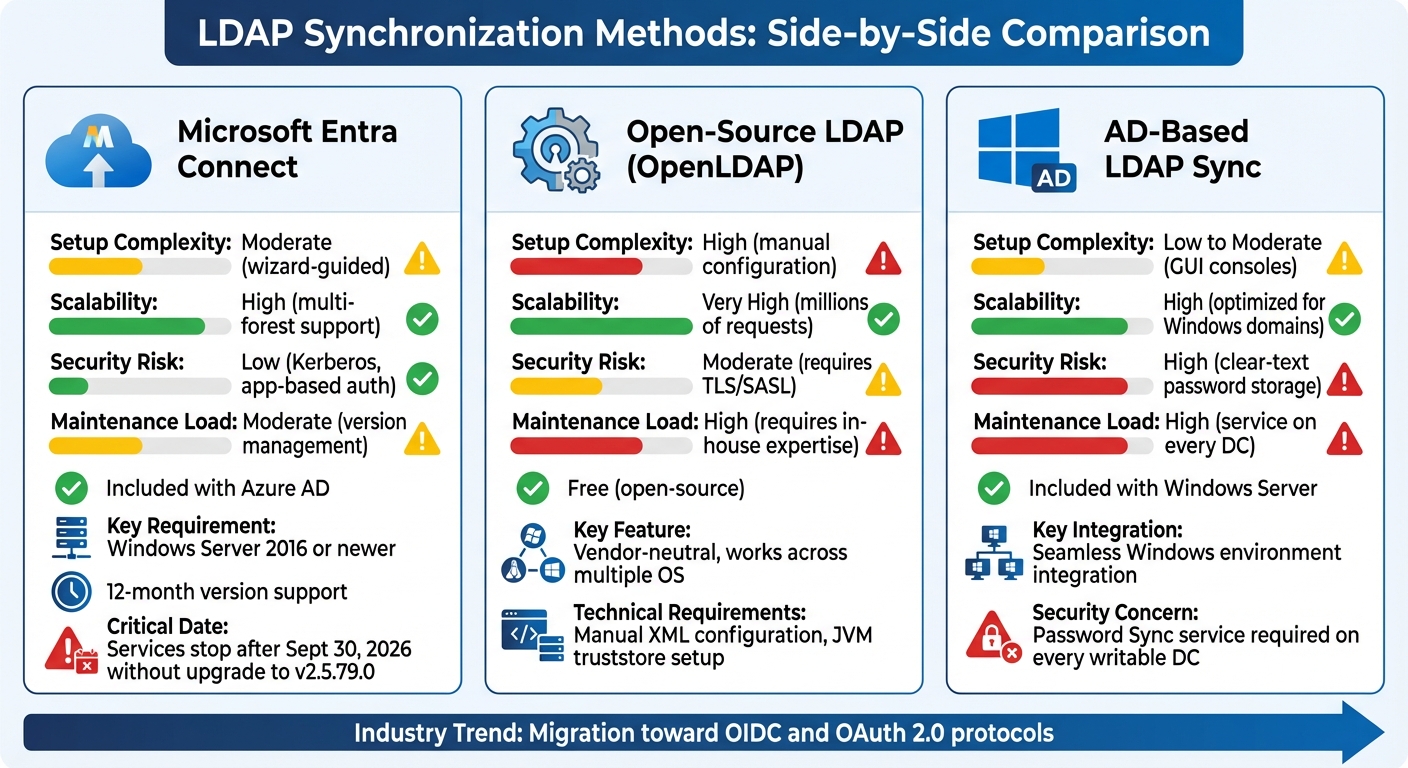
LDAP Synchronization Methods Comparison: Microsoft Entra Connect vs OpenShift vs Active Directory
Every synchronization method comes with its own strengths and challenges. Let’s break down the key options:
Microsoft Entra Connect is a solid choice for organizations heavily integrated into the Microsoft ecosystem. It features a wizard-driven setup and automated synchronization, making it relatively straightforward to implement. However, it has some important requirements: it runs only on Windows Server 2016 or newer, and administrators must carefully manage version updates. For example, services will stop functioning after September 30, 2026, unless upgraded to version 2.5.79.0. Additionally, version 2.x has a 12-month support cycle, meaning regular updates are essential to avoid disruptions.
Open-source LDAP Group Sync, such as OpenLDAP, stands out for its flexibility and vendor neutrality. It works well in mixed environments with multiple operating systems and is completely free, capable of handling millions of authentication requests. On the flip side, it demands significant technical expertise. Administrators need to manually configure XML files and set up JVM truststores for certificates, making it a more complex solution to manage.
Active Directory-Based LDAP Sync integrates seamlessly with Windows-centric environments, but it comes with notable security and maintenance concerns. For synchronization with Active Directory, the Directory Server may need to store passwords in clear text within the internal changelog – a clear security risk. Additionally, a Password Sync service must be installed on every writable Domain Controller, increasing the maintenance workload. Over time, synchronization can consume server threads and file descriptors, leading to high disk usage as changelogs grow.
To better understand these methods, here’s a comparison of their operational characteristics:
| Criteria | Microsoft Entra Connect | Open-Source LDAP | AD-Based LDAP Sync |
|---|---|---|---|
| Setup Complexity | Moderate (wizard-guided) | High (manual configuration) | Low to Moderate (GUI consoles) |
| Scalability | High (multi-forest support) | Very High (millions of requests) | High (optimized for Windows domains) |
| Security Risk | Low (Kerberos, app-based auth) | Moderate (requires TLS/SASL) | High (clear-text password storage) |
| Maintenance Load | Moderate (version management) | High (requires in-house expertise) | High (service on every DC) |
| Cost | Included with Azure AD | Free (open-source) | Included with Windows Server |
As organizations evaluate these options, it’s worth noting a broader industry trend: many are moving away from traditional LDAP-based methods toward modern protocols like OIDC and OAuth 2.0. For instance, MongoDB will no longer support LDAP authentication starting with version 8.0. Modern Identity Federation solutions, which use access tokens valid for just one hour, offer a significant security upgrade compared to persistent LDAP credentials. These factors should be weighed carefully when choosing a synchronization approach that fits your hybrid infrastructure needs.
Conclusion
Choosing the right LDAP synchronization method depends entirely on your infrastructure and operational priorities. If your environment deals with limited bandwidth and frequent, small directory updates, Delta-syncrepl is a standout option. It’s designed to minimize redundant data transfer by sending only the changes. For instance, in a directory with 102,400 objects at 1 KB each, a simple two-byte attribute change using standard Syncrepl would transfer 100 MB of data to update just 200 KB – wasting 99.98% of the bandwidth. Delta-syncrepl avoids this waste by transferring only the updated data.
For cloud-native setups, particularly those integrating with Microsoft 365 or Azure, Microsoft Entra Connect is a strong contender. It offers automated provisioning and hybrid identity management, making it a seamless solution for managing on-premises and cloud resources together.
In containerized environments, OpenShift LDAP Group Sync with fractional replication is a practical choice. This method focuses on syncing only the attributes or entries that applications need, reducing the replication footprint and boosting efficiency. Plus, its consumer-side engine doesn’t require changes to the provider server, making it a convenient solution for connecting legacy systems without significant downtime.
For scenarios where high availability is a priority, Mirror Mode provides a balance of consistency and failover support, particularly in write-heavy environments. The key is to align your synchronization method with the unique demands of your hybrid infrastructure to achieve the best performance and reliability.
FAQs
What challenges can arise when synchronizing LDAP in hybrid IT systems?
Synchronizing LDAP in hybrid IT systems – where on-premises directories interact with cloud-based identity stores – comes with its fair share of hurdles. One major challenge is dealing with schema mismatches. Differences between systems often mean you’ll need to carefully map attributes to avoid errors or inconsistent data.
Then there’s the matter of performance and scalability. Managing large user bases across networks can strain resources, especially if filters and queries aren’t optimized. Without proper tuning, unnecessary data transfers can bog down the system.
Latency and consistency also pose significant issues. Network delays or interruptions can lead to missed updates, leaving you with outdated or incomplete information. And when changes happen in multiple locations, conflict resolution becomes critical. Without robust mechanisms, you risk synchronization loops or even data corruption.
Lastly, the complexity of replication topologies can be daunting. Setting up secure authentication across systems is no small task and often adds to operational overhead. To tackle all these challenges, precise configuration, reliable tools, and ongoing monitoring are key to keeping synchronization smooth and efficient.
How does Microsoft Entra Connect provide secure and efficient synchronization for hybrid systems?
Microsoft Entra Connect provides a secure and streamlined way to synchronize by using agent-less connectors. These connectors rely on standard remote protocols, eliminating the need for specialized agents. This approach not only simplifies the system but also reduces potential vulnerabilities, offering a stronger security posture.
Built on a metadirectory-based platform, it efficiently handles connector and attribute-flow processing. This setup ensures quick, dependable, and scalable integration, making it a perfect fit for hybrid IT environments.
Why are organizations transitioning from LDAP to modern protocols like OIDC or OAuth 2.0?
Many organizations are shifting away from LDAP and embracing modern protocols like OIDC (OpenID Connect) or OAuth 2.0. These newer approaches rely on token-based authentication, which not only reduces the risks tied to older methods but also streamlines the implementation process.
Switching to OIDC or OAuth 2.0 offers several advantages, including standardized workflows, improved scalability, and stronger compatibility with cloud and hybrid environments. These qualities make them a perfect fit for today’s IT systems, where seamless integration and strong security are top priorities.







