

Cloud vs On-Premises Disaster Recovery: Key Differences

Choosing between cloud and on-premises disaster recovery (DR) comes down to cost, control, and recovery speed. Here’s what you need to know:
- Cloud DR relies on third-party infrastructure, offering flexibility and scalability with a pay-as-you-go model. It eliminates the need for upfront hardware investments and provides global redundancy but depends on internet connectivity and may incur unpredictable costs during recovery.
- On-Premises DR requires significant upfront investment in hardware and facilities but offers complete control, faster recovery over local networks, and predictable costs. However, scalability is slower, and it’s vulnerable to regional disasters if not geographically separated.
Key Factors to Consider:
- Costs: Cloud DR has lower initial costs but fluctuating expenses. On-premises DR requires high upfront spending but stable ongoing costs.
- Scalability: Cloud DR scales instantly; on-premises takes time and hardware upgrades.
- Recovery Metrics: Cloud DR can achieve near-zero Recovery Point Objectives (RPO) and fast Recovery Time Objectives (RTO) with advanced setups. On-premises DR varies based on configuration but excels in local recovery speed.
- Control: Cloud DR shares responsibility with providers, while on-premises offers full control over infrastructure and data.
- Compliance Needs: On-premises is often preferred for industries with strict regulatory requirements.
Quick Comparison:
| Feature | Cloud DR | On-Premises DR |
|---|---|---|
| Cost Model | Operating Expense (OpEx) | Capital Expense (CapEx) |
| Initial Investment | Low | High |
| Scalability | Immediate | Slower |
| RTO/RPO | Minutes to hours/near-zero | Varies; often faster locally |
| Maintenance | Provider-managed | In-house IT |
| Control | Shared | Full |
| Geographic Risk | Low (multi-region) | High (if local) |
Cloud DR is ideal for businesses prioritizing flexibility and cost-efficiency, while on-premises DR suits organizations needing full control and compliance. Hybrid strategies can combine the strengths of both.
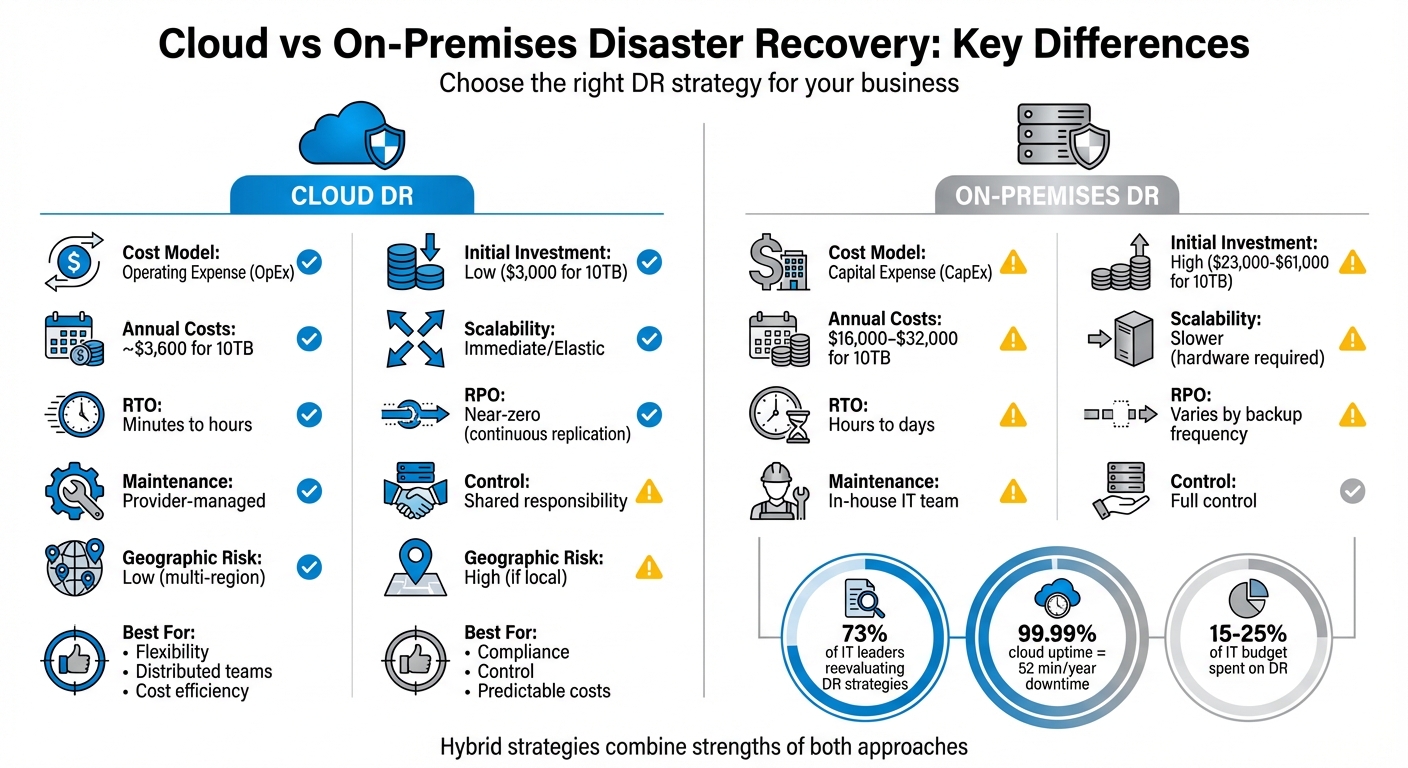
Cloud vs On-Premises Disaster Recovery Comparison Chart
Cloud Disaster Recovery Architecture: Backup, Pilot Light, Warm Standby, Active‑Active
Cost Analysis
When evaluating disaster recovery options, the financial considerations go far beyond the initial price tag. Cloud DR operates on a subscription basis, meaning you pay only for the resources you use, making it a flexible option. On the other hand, on-premises DR involves a hefty upfront investment in hardware, software, and facilities before it’s operational.
Cloud DR Pricing
Cloud disaster recovery uses a pay-as-you-go model, turning what would traditionally be a large capital expense into a manageable monthly operating cost. For instance, AWS Elastic Disaster Recovery charges $0.028 per source server per hour. For a small business managing 20-50 virtual machines, monthly costs often range between $2,000 and $4,000. Larger enterprises running 200+ virtual machines might see costs between $8,000 and $15,000 or more per month.
"AWS allows you to trade the fixed capital expense of a physical backup data center for the variable operating expense of a rightsized environment in the cloud, which can significantly reduce cost." – AWS Whitepaper
With cloud DR, most of the regular costs come from storage during normal operations, while compute costs spike during disaster recovery events or testing. This pricing structure makes it easier to predict and manage expenses.
On-Premises DR Pricing
For on-premises disaster recovery, the story is different. It begins with a substantial upfront investment. A small business with 100-500 employees might spend $20,000 to $50,000 on hardware alone. Larger organizations could face initial costs of $200,000 to $500,000+ for servers, storage systems, and networking equipment.
But these upfront expenses are just the start. Additional costs include redundant power systems, cooling infrastructure, physical security measures, software licenses (often requiring significant upfront fees), and the salaries of dedicated IT staff. Maintenance costs – like hardware upgrades, replacement parts, and staff hours – add to the ongoing financial burden. On average, disaster recovery can consume 15-25% of a company’s total IT budget, with on-premises solutions accounting for the largest share.
Cost Comparison Table
| Cost Category | On-Premises DR | Cloud DR |
|---|---|---|
| Initial Investment | $20,000 – $500,000+ | Minimal to zero |
| Pricing Model | Capital Expenditure (CapEx) | Operating Expenditure (OpEx) |
| Hardware Costs | Full hardware procurement and maintenance | Included in subscription |
| Software Licensing | Upfront enterprise fees | Included in service fee |
| Facilities | Secondary site with power, cooling, security | Managed by provider |
| Maintenance | Internal staff and replacement parts | Provider handles infrastructure |
| Scalability | Requires new hardware purchases | Elastic; pay for what you add |
| Testing Costs | Dedicated hardware and staff time | Hourly compute charges during drills |
Hidden Costs and Scalability
On-premises solutions often require over-provisioning to handle peak loads, which means paying for capacity that sits idle most of the time. In contrast, cloud DR offers scalability on demand – you pay for additional resources only when you need them. With 73% of IT leaders reevaluating their disaster recovery strategies, understanding these cost dynamics is essential for choosing the right path.
Performance and Recovery Metrics
When disaster strikes, two critical factors determine your business’s ability to recover: Recovery Time Objective (RTO) and Recovery Point Objective (RPO). RTO measures the maximum acceptable downtime, while RPO defines the maximum tolerable data loss, which could range from as little as 15 minutes to as much as 24 hours. Let’s break down how cloud-based and on-premises solutions stack up in terms of these metrics.
Cloud RTO and RPO
The performance of cloud disaster recovery solutions hinges on the specific strategy employed and the quality of internet bandwidth. For instance, AWS Elastic Disaster Recovery can deliver an RPO measured in seconds and an RTO of just minutes by using continuous block-level replication – assuming sufficient bandwidth is available. On the other hand, the "Backup and Restore" approach typically involves longer recovery times, often measured in hours, with an RPO of up to 24 hours. A "Warm Standby" setup, where a scaled-down version of your environment runs continuously, offers faster recovery (minutes) and minimal data loss.
Cloud providers design their regional resources for high availability – 99.99% uptime, which equates to roughly 52 minutes of downtime annually. Some services go even further. For example, Google Spanner achieves 99.999% availability by distributing resources across multiple regions. Similarly, Amazon Aurora global databases replicate data to secondary regions with sub-second latency, and promoting a secondary region to primary can take less than one minute, even during a complete regional outage.
On-Premises RTO and RPO
On-premises systems often benefit from direct access to local backups, which can provide faster recovery for localized failures. For example, a "Hot Site" configuration with synchronous mirroring can achieve zero RPO and recovery times measured in minutes. This is because data is continuously mirrored in real time to a secondary location. However, this level of performance comes with a hefty price tag, as it requires significant investment in redundant hardware and dedicated fiber connections for real-time synchronization.
In contrast, a "Cold Site" setup – where only basic infrastructure and physical space are maintained – results in significantly slower recovery times, often taking days or even weeks. RPOs in these cases are similarly extended due to reliance on periodic tape backups or manual data transfers. Another drawback of on-premises systems is their vulnerability to regional disasters, such as floods or widespread power outages, as backup sites are often located in close physical proximity to the primary site.
Performance Comparison Table
| DR Strategy | Typical RTO | Typical RPO | Replication Type | Bandwidth/Latency Needs |
|---|---|---|---|---|
| On-Premises Hot Site | Minutes | Zero / Near-Zero | Synchronous Mirroring | High (Local/Dedicated Fiber) |
| On-Premises Cold Site | Days / Weeks | Days / Weeks | Tape / Manual Backup | Low (Physical Transport) |
| Cloud Backup & Restore | Hours | 24 Hours | Snapshot / Asynchronous | Moderate (Internet/VPN) |
| Cloud Pilot Light | Minutes / Hours | Seconds / Minutes | Continuous Asynchronous | High (Continuous Stream) |
| Cloud Warm Standby | Minutes | Seconds / Minutes | Continuous Asynchronous | High (Continuous Stream) |
| Cloud Multi-Site (Active/Active) | Near Zero | Zero / Near-Zero | Synchronous / Multi-Master | Extremely High (Global Network) |
sbb-itb-59e1987
Pros and Cons
Every disaster recovery (DR) strategy has its own strengths and challenges. Knowing these trade-offs is key to making decisions that align with your organization’s needs, budget, and risk tolerance. Below, we break down the practical considerations for cloud-based and on-premises DR options.
Cloud DR Pros and Cons
Cloud-based disaster recovery is all about flexibility and scalability. You can adjust resources instantly based on your data needs, and the pay-as-you-go model eliminates the need for heavy upfront investments. This makes enterprise-level DR affordable, even for smaller businesses. Plus, cloud providers often offer built-in geographic redundancy, protecting your data from localized disasters like hurricanes or floods that could devastate a single physical location.
Another big advantage? Cloud providers handle updates, patches, and infrastructure maintenance, cutting down on IT workload. Many services also include automated failover with 24/7 monitoring, which can switch operations to a backup site in minutes without manual intervention. And when it comes to data durability, cloud providers often guarantee 99.999999999% durability (11 nines), meaning the risk of data loss is practically negligible.
That said, cloud DR isn’t perfect. Internet dependency is a major vulnerability – if your connection goes down, you can’t access your recovery environment. Restoring large datasets can also be slow, as it’s limited by WAN bandwidth, which is typically slower than local network speeds. There’s also the issue of vendor lock-in; moving massive amounts of data between cloud providers can be both costly and technically challenging. While initial costs are low, recurring subscription fees and data egress charges can add up over time. And during an actual disaster, costs can spike unpredictably. As Brien Posey from TechTarget explains:
"The cost would be significant, but the actual cost would likely remain a mystery until the bill arrived."
On-Premises DR Pros and Cons
With on-premises disaster recovery, you have total control over your infrastructure, from security protocols to hardware configurations. This setup allows for rapid data restoration over LAN, avoiding delays caused by internet speeds. For organizations with strict regulatory requirements like HIPAA or GDPR, on-premises solutions can simplify compliance by ensuring physical data residency and hardware isolation. Once the initial investment is made, ongoing costs are predictable, with no surprise bills during recovery events.
However, on-premises DR comes with its own challenges. The upfront costs are high, and scalability is limited – you’ll need to purchase new hardware to expand. If your DR site is located near your primary site, both could be impacted by the same regional disaster, creating a single point of failure. Additionally, managing an on-premises solution requires around-the-clock IT support for updates, testing, and hardware maintenance.
Pros and Cons Comparison Table
| Feature | Cloud Disaster Recovery | On-Premises Disaster Recovery |
|---|---|---|
| Initial Investment | Low (OpEx model) | High (CapEx required) |
| Scalability | Instant and near-infinite | Limited by hardware |
| Recovery Speed | Limited by internet bandwidth | High-speed over LAN/fiber |
| Infrastructure Control | Shared with provider | Full internal control |
| Maintenance Responsibility | Managed by provider | Managed by in-house IT |
| Geographic Risk | Low (multi-region replication) | High (site-specific vulnerability) |
| Cost Predictability | Variable; can spike during failover | Stable and predictable |
| Regulatory Compliance | Requires careful SLA review | Easier for strict data residency rules |
| Testing Complexity | Simple and non-disruptive | Complex; may impact production |
Use Cases and Implementation
Let’s dive into specific scenarios where different disaster recovery (DR) solutions shine and outline the steps to effectively implement them.
When to Use Cloud Disaster Recovery
Cloud disaster recovery (DR) works best when scalability and flexibility are top priorities. If your business experiences fluctuating demand, cloud solutions allow you to scale resources up or down as needed, avoiding the expense of maintaining a secondary data center. This is particularly useful for startups and mid-sized businesses that need cost-effective options.
Remote and distributed teams gain a lot from cloud DR since recovery environments are accessible via the internet, even if physical office locations are unavailable. This setup also supports operations across multiple time zones. Another major perk is geographic redundancy – cloud providers offer multi-region architectures to safeguard against widespread natural disasters. For businesses needing multi-region DR, virtual private servers (VPS) or dedicated servers in different regions, like those offered by Serverion, ensure reliable geographic separation.
The 3-2-1 rule fits perfectly with cloud DR: keep 3 copies of your data, store them on 2 different types of media, and ensure 1 copy is stored offsite in the cloud. Additionally, organizations looking to shift from capital expenses (CapEx) to operating expenses (OpEx) will find cloud DR appealing. Instead of investing in physical infrastructure, you pay manageable monthly fees.
When to Use On-Premises Disaster Recovery
On-premises DR is the go-to choice for industries with strict regulatory requirements. Sectors like healthcare, finance, and government – governed by standards such as HIPAA, PCI DSS, or SOC – often mandate specific physical distances between primary and recovery sites, as well as strict data residency controls. Having full control over where data is stored and who can access it physically is a key advantage.
For operations that demand ultra-low latency or rely on specialized hardware, on-premises setups are often the better option. If restoring data at LAN speeds is critical, avoiding internet bandwidth limitations makes sense. Another benefit is cost predictability – once you’ve made the initial investment, there are no unexpected bills during a failover event. Unlike cloud solutions, where costs can spike during a disaster, on-premises systems offer stable pricing.
How to Implement DR Solutions
Once you’ve chosen the right DR strategy, implementation involves a few key phases.
Start with a risk assessment to identify potential threats, such as cyberattacks, hardware failures, natural disasters, or human error. Follow this with a Business Impact Analysis (BIA) to understand how these risks could affect your finances and operations. This step is crucial for defining your Recovery Time Objective (RTO) and Recovery Point Objective (RPO), which will guide the rest of your plan.
Next, select your DR approach based on your objectives:
- Cold strategies: These are the least expensive but have the longest RTO, as no resources are pre-allocated.
- Warm strategies: These keep standby resources available, offering a balance of moderate RTO and cost.
- Hot strategies: These provide real-time replication with near-zero RTO, but they come at a higher price.
For cloud implementations, consider using Infrastructure as Code (IaC) tools like AWS CloudFormation or Terraform to automate the setup of your recovery environment. This reduces human error and ensures consistency during failover events.
Testing is non-negotiable. Regularly conduct drills to confirm your team can meet recovery targets under pressure. Be specific in your documentation – don’t just say, “Run the restore script.” Instead, provide exact steps, like “Open a shell and run /home/example/restore.sh.”
For cloud DR, use continuous asynchronous replication to minimize your RPO. In on-premises setups, implement tiered storage: keep recent backups on high-speed storage for quick recovery, while older data can be stored on slower, more cost-effective media. Regular testing and clear documentation ensure your DR plan is ready when you need it most.
Key Differences
Side-by-Side Comparison Table
The table above provides an overview of the key differences, but let’s break down how these distinctions influence cost, performance, and control.
Cloud and on-premises disaster recovery (DR) take different approaches when it comes to costs, scalability, and management. Here’s a closer look at these differences:
| Feature | Cloud Disaster Recovery | On-Premises Disaster Recovery |
|---|---|---|
| Cost Model | OpEx (subscription/usage-based) | CapEx (upfront investment) |
| Initial Investment | Low (around $3,000 for 10 TB setup) | High ($23,000–$61,000 for 10 TB setup) |
| Annual Operating Costs | Approximately $3,600 for 10 TB | $16,000–$32,000 for 10 TB |
| Scalability | Immediate; scale up or down as needed | Slower; involves hardware procurement |
| RTO (Recovery Time) | Minutes to hours; near-zero with multi-site | Hours to days; depends on hardware availability |
| RPO (Recovery Point) | Near-zero with continuous replication | Varies; determined by backup frequency |
| Maintenance | Handled by the provider | Managed by your internal IT team |
| Control | Shared responsibility model | Full control over hardware and security |
| Accessibility | Available anywhere with internet access | Restricted to physical site or VPN |
| Data Retrieval Costs | May incur egress fees during recovery | No additional retrieval costs |
When it comes to costs, the two models couldn’t be more different. On-premises DR requires a hefty upfront investment but offers predictable ongoing expenses. By contrast, cloud DR keeps initial costs low but introduces the potential for fluctuating fees, especially during recovery events when data retrieval (egress) fees can add up quickly.
Cloud DR also shines in scalability and speed. Resources can be provisioned in minutes, making it ideal for businesses that need flexibility. On-premises DR, on the other hand, involves a slower process due to hardware acquisition and setup. However, as cloud costs rise and performance challenges emerge, some organizations find themselves leaning back toward on-premises solutions for better long-term control.
Control and compliance are where on-premises DR often takes the lead. Industries like healthcare, finance, and government, which require strict regulatory adherence, prefer the visibility and physical control that come with managing their own infrastructure. With cloud DR, the shared responsibility model means the provider handles the physical infrastructure, while you retain control over your data and applications.
Conclusion
These differences play a critical role in shaping your disaster recovery strategy. The right choice depends on your specific goals and needs. Cloud DR offers flexibility and rapid scalability, making it a strong option for businesses that prioritize agility. On-premises DR, meanwhile, provides full control and predictable costs, which can be crucial for industries with strict compliance requirements or those managing sensitive data.
For many organizations, hybrid strategies are emerging as the best of both worlds. By keeping critical workloads on-premises for control and performance while using cloud infrastructure for offsite redundancy and scalability, businesses can balance the strengths of each model.
Serverion’s global data center network supports cloud-based disaster recovery with options like dedicated servers, VPS, and colocation services across multiple regions. Whether you’re pursuing a fully cloud-based approach or a hybrid model, having a reliable hosting infrastructure with geographic separation is essential. To ensure success, it’s crucial to conduct a thorough Total Cost of Ownership (TCO) analysis and regularly test your solution to meet your Recovery Time Objective (RTO) and Recovery Point Objective (RPO) targets when disaster strikes.
FAQs
What are the cost differences between cloud-based and on-premises disaster recovery?
The key difference in cost comes down to how expenses are managed. On-premises disaster recovery demands a hefty upfront investment. Companies need to spend on hardware, facilities, power, and staffing to maintain a secondary data center. Unfortunately, this backup site often sits idle until a disaster strikes, leading to ongoing costs that can eat up a big chunk of the IT budget – typically around 15–25%.
On the other hand, cloud-based disaster recovery (DR) uses a more flexible, pay-as-you-go model. Instead of sinking money into large capital expenses, businesses pay monthly or based on usage, covering only the resources they actually need. This approach eliminates the need for hardware upgrades, site upkeep, and dedicated staff, significantly lowering overall costs. Plus, cloud DR makes it easy to scale up or down, ensuring resources align with actual recovery needs.
For businesses in the U.S., cloud DR provides the added benefit of predictable monthly expenses, like subscription or storage fees, which fit neatly into annual budgets. Services like those from Serverion offer a budget-friendly alternative by cutting out the need for costly secondary sites and letting companies pay only for the capacity they use.
How does internet connectivity impact the performance of cloud-based disaster recovery?
Internet connectivity is a key factor in how well cloud-based disaster recovery performs. Since these solutions depend on transferring data over the internet, the reliability and speed of your connection can significantly impact how quickly you can recover and keep systems running during a crisis. An unstable or slow connection might cause delays in accessing important data or restarting operations.
To avoid these issues, it’s critical to invest in a fast, reliable internet connection and have backup options in place. This approach ensures smoother data transfers and reduces downtime, helping your business stay operational even when faced with unexpected challenges.
What are the benefits of using a hybrid disaster recovery strategy?
A hybrid disaster recovery strategy blends the strengths of on-premises infrastructure with the advantages of cloud-based solutions. This approach offers the control, performance, and regulatory compliance of physical systems while tapping into the scalability, cost savings, and speed that cloud technology provides. It’s a smart way for businesses to fine-tune their disaster recovery plans to fit their unique needs.
By incorporating cloud features, businesses can benefit from quicker recovery times, automated testing processes, and greater adaptability to meet recovery time objectives (RTO) and recovery point objectives (RPO). On top of that, this strategy simplifies operations and cuts costs, making it an effective solution for organizations with varied disaster recovery demands.







