

Hybrid Cloud Sync: Best Practices

Hybrid cloud synchronization ensures your data remains accurate, secure, and accessible across on-premises and cloud environments. This process is vital for businesses managing sensitive data locally while leveraging cloud scalability for other operations. With 73% of businesses using hybrid cloud solutions as of 2024, efficient synchronization is more important than ever.
Key Takeaways:
- Security: Protect data with encryption (AES-256), secure connections (VPNs), and role-based access control (RBAC). Use the 3-2-1 backup rule and immutable storage to guard against ransomware.
- Efficiency: Techniques like Change Data Capture (CDC), event-based syncing, and periodic batch refresh help balance cost, speed, and data consistency.
- Performance: Monitor key metrics like latency, bandwidth, and sync health. Optimize connectivity with dedicated circuits and incremental transfers for large datasets.
- Preparation: Assess data needs, map network topology, and define compliance policies to avoid fragmentation and ensure smooth operations.
- Reliability: Establish failover connections, conflict resolution rules, and real-time alerts for consistent uptime and secure data recovery.
By following these practices, you can maintain secure, reliable, and efficient hybrid cloud synchronization while minimizing risks and costs.
Simplify Hybrid Storage with Azure File & Sync – Step-by-Step Guide!
Preparation Checklist
Before synchronizing hybrid cloud data, it’s crucial to have a clear plan in place. This helps avoid issues like data fragmentation, compliance violations, and unexpected costs. The preparation phase lays the groundwork for a smooth and efficient synchronization process. Start by evaluating your data needs to establish clear synchronization parameters.
Assess Data Requirements
Begin by cataloging all shares and folders, noting file and object counts. This step ensures you stay within synchronization service quotas and understand the size and scope of your project. Separate active data, which requires regular updates, from archival data that may not need frequent syncing.
File size plays a significant role in synchronization efficiency. Large files transfer more smoothly, while a large number of small files can slow things down due to the overhead of managing metadata. Decide whether bi-directional or one-way synchronization is better suited to your needs.
For large-scale data – think terabytes or petabytes – consider a hybrid approach. Start with offline seeding using physical disks, then use online delta syncs for ongoing updates. This method saves bandwidth and accelerates the initial synchronization process. Also, measure your current IOPS and disk throughput to anticipate the extra load synchronization will place on your systems.
| Transfer Method | Ideal Candidate | Constraints |
|---|---|---|
| Online Sync | Small to medium datasets; high bandwidth; frequent changes | Limited by network speed and reliability |
| Offline Transfer | Large datasets; limited or costly bandwidth | One-time transfer; requires physical shipping |
| Hybrid Approach | Large datasets with continuous updates | Requires offline seeding followed by online sync |
Understand Network Topology
Once you’ve outlined your data requirements, map your network topology to determine the best connectivity options. This will help you decide whether you need dedicated connections like AWS Direct Connect or Google Cloud Interconnect, or if a VPN will suffice. Choosing the right connectivity ensures your workload runs reliably and efficiently.
"Selecting and configuring appropriate connectivity solutions will increase the reliability of your workload and maximize performance." – AWS Well-Architected Framework
For latency-sensitive workloads, consider placing them closer to data sources or at the edge to minimize delays. Avoid splitting traffic between a dedicated connection and a VPN, as differences in latency and bandwidth can lead to performance issues.
Use your internal network monitoring tools to estimate bandwidth and latency needs before setting up hybrid connectivity. To ensure uninterrupted synchronization, establish failover connections for maintenance windows or unexpected outages. Many organizations aim for 99.99% availability as a benchmark for their hybrid cloud setups.
Define Governance and Compliance Policies
Governance policies are essential to avoid regulatory risks and operational hiccups. Alarmingly, 85% of organizations reported at least one ransomware attack in the past year, and 93% of these attacks targeted backups to block recovery efforts. Even more concerning, 34% of organizations mistakenly think that PaaS offerings like file shares don’t require backups.
Set clear data residency rules to comply with regulations like GDPR or HIPAA, which may require certain data to remain on-premises or within specific regions. Assign a single point of responsibility for data ownership and classification before migration begins. Regularly audit Identity and Access Management (IAM) roles and rotate access keys to maintain a secure environment.
Tie governance policies to business goals. For instance, if minimizing downtime is critical, establish a clear availability target like 99.99% uptime. Develop a detailed runbook that includes validation steps, cutover procedures, and a rollback plan to handle potential issues during synchronization. These measures create a secure and efficient foundation for hybrid cloud synchronization.
Synchronization Techniques Checklist
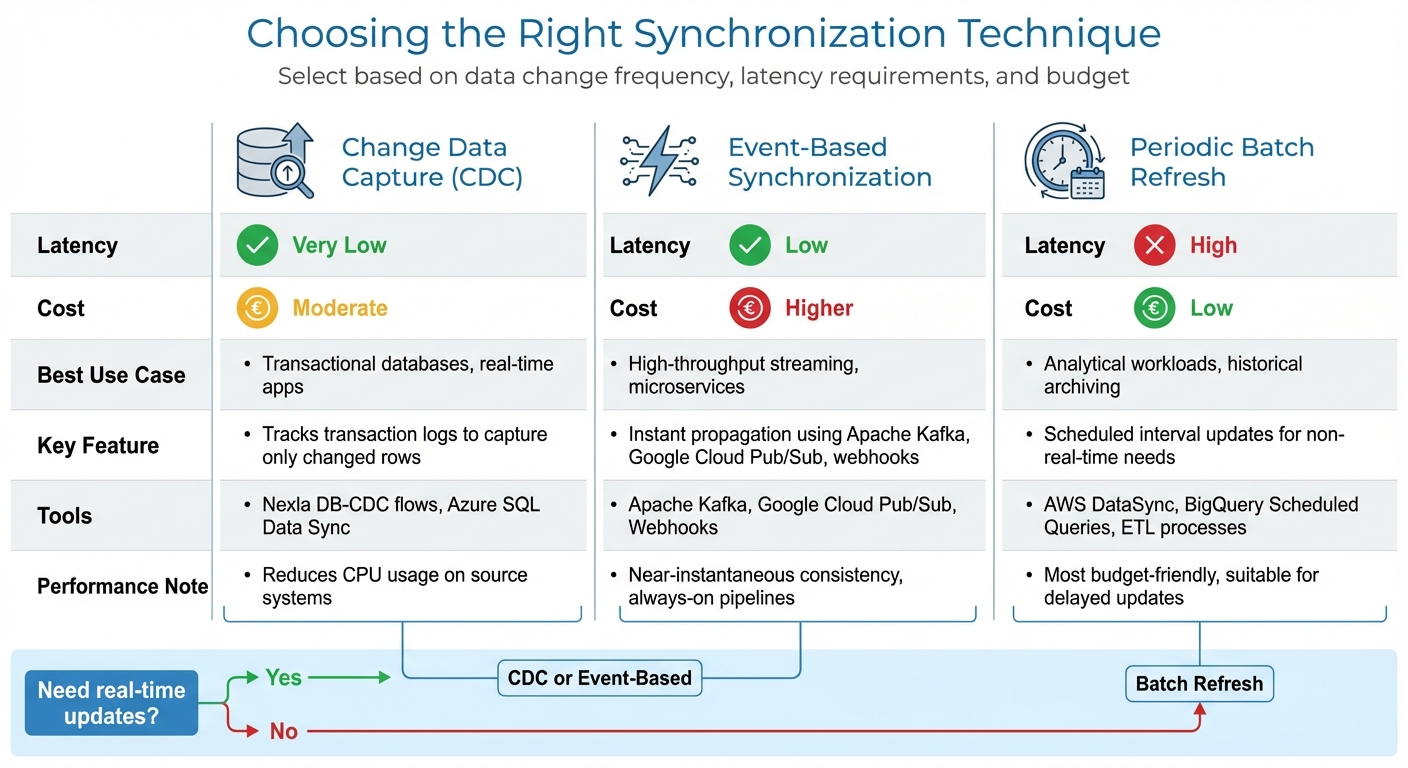
Hybrid Cloud Synchronization Techniques Comparison: CDC vs Event-Based vs Batch Refresh
After preparing your hybrid cloud environment, selecting the right synchronization technique is essential for maintaining efficiency and security. The method you choose directly impacts how well your hybrid cloud performs, and it depends on factors like how often data changes, latency requirements, and budget considerations. Each technique has its strengths, so it’s important to align your choice with your specific workload needs. Here’s a closer look at some key synchronization methods and when to use them.
Change Data Capture (CDC)
Change Data Capture (CDC) tracks transaction logs to identify and capture only the rows that have changed, avoiding the need to scan entire tables. This log-based method minimizes the load on your source system while enabling near-real-time synchronization. Tools like Nexla DB-CDC flows and Azure SQL Data Sync use CDC to ensure consistent data across distributed databases.
Log-based CDC is particularly efficient because it reads directly from transaction logs instead of querying tables repeatedly. This approach reduces CPU usage on your source systems and ensures no changes are missed. To optimize performance, place the sync agent close to the busiest database, which helps reduce lag and increases throughput.
Important notes: Azure SQL Data Sync is set to retire on September 30, 2027, so if you’re using it, begin planning your migration to an alternative CDC solution. Also, keep in mind that if a change fails to sync for 45 days, the database is marked as "out-of-date", potentially leading to data loss.
Event-Based Synchronization
Event-based synchronization uses platforms like Apache Kafka, Google Cloud Pub/Sub, or webhooks to instantly propagate updates as they occur. This method is ideal for high-throughput environments where multiple systems or applications need to respond to data changes in near real-time. For instance, when a new order is placed in an e-commerce system, the event triggers an update that flows immediately to all connected systems.
While this approach ensures near-instantaneous data consistency, it comes with higher infrastructure costs due to the need for always-on streaming pipelines. It’s a great fit for scenarios like connecting SaaS platforms or coordinating updates across systems in different locations where timing is critical.
If your workload doesn’t require immediate updates, the next method – periodic batch refresh – might be a more cost-friendly option.
Periodic Batch Refresh
Periodic batch synchronization involves updating data at scheduled intervals, making it a practical choice for analytics, reporting, or archiving where real-time updates aren’t necessary. Tools such as AWS DataSync, BigQuery Scheduled Queries, and traditional ETL processes handle bulk transfers effectively while keeping costs manageable.
This method is the most budget-friendly because it avoids maintaining continuous connections or processing individual changes as they happen. It’s particularly useful for data warehouses, reporting systems, and backup operations where a delay of a few hours is acceptable. For very large datasets, you can combine an initial offline transfer (using physical disks) with ongoing batch syncs to handle incremental updates – a balanced approach that saves both time and money.
| Technique | Latency | Cost | Best Use Case |
|---|---|---|---|
| CDC | Very Low | Moderate | Transactional databases, real-time apps |
| Event-Based | Low | Higher | High-throughput streaming, microservices |
| Periodic Batch | High | Low | Analytical workloads, historical archiving |
When setting up a new synchronization group, it’s best to start with data in just one location. If data is already present in multiple databases, the system will need to perform row-by-row conflict checks, which can significantly slow down the initial sync. Instead, use bulk inserts into an empty target database to streamline the process. Each of these techniques plays a crucial role in ensuring hybrid cloud synchronization stays consistent and reliable.
Performance and Monitoring Checklist
Once you’ve selected your synchronization method, the next step is ensuring it operates smoothly. In hybrid cloud environments, keeping a close eye on performance is essential for maintaining continuity and security. Effective monitoring can uncover sync issues before they grow into larger problems. By tracking the right metrics and centralizing visibility across your infrastructure, you can catch bottlenecks early and ensure data moves reliably between your on-premises systems and the cloud. Let’s dive into the key metrics to monitor and how to streamline your setup.
Track Key Metrics
Pay attention to metrics that directly influence the performance and reliability of your synchronization process. Start with data transfer volume, which reflects the scale of your operations. This includes tracking both "Bytes Synced" (total file size transferred) and "Files Synced" (number of items moved). To evaluate network health, keep an eye on throughput and bandwidth, measuring upload and download speeds in bytes per second, along with the rate of file operations per second. These figures can help pinpoint network bottlenecks.
Latency is another critical factor. Measure the round-trip time for network packets between your on-premises systems and the cloud to identify delays. Additionally, monitor sync health by checking "Sync Session Results" (success vs. failure rates) and "Files Not Syncing" error counts. If the number of unsynced files exceeds 100, set up alerts to address the issue before it disrupts users.
For environments using cloud-tiered storage, track metrics like "Cache Hit Rate" (percentage of data served from the local cache versus retrieved from the cloud) and "Recall Throughput" to evaluate cache efficiency. Azure File Sync, for example, automatically sends metrics to Azure Monitor every 15 to 20 minutes, providing regular updates on system health. On Windows servers, use Performance Monitor (Perfmon.exe) to view real-time counters like "AFS Bytes Transferred" and "AFS Sync Operations" for immediate insights into local sync activity. With these metrics in hand, centralizing your monitoring efforts becomes much easier.
Set Up Unified Monitoring
Centralized monitoring is key to avoiding blind spots. Instead of juggling separate dashboards for storage, network, and compute layers, integrate everything into a single platform like Azure Monitor or Amazon CloudWatch. These tools gather telemetry from various components – storage arrays, virtual machines, containers, network devices, and cloud services – and present them in one unified view.
The secret to effective monitoring lies in leveraging standardized data models. This eliminates the need for manual data normalization, ensuring metrics remain consistent across different vendors and platforms. Microsoft refers to this as creating "a standard operational model that breaks down silos and delivers consistent practices everywhere."
A unified view also speeds up troubleshooting. For example, if synchronization slows down, you can quickly determine whether the issue is related to storage IOPS, network congestion, or insufficient compute resources on your sync agents. Some platforms even use AI to establish performance baselines, detect anomalies, and predict potential problems before they affect operations. Once you’ve consolidated your monitoring, focus on reducing latency to further refine your system.
Optimize for Low Latency
Reducing latency begins with choosing the right connectivity options. For example, AWS Direct Connect provides dedicated fiber connections with speeds of up to 100 Gbps, offering lower latency and jitter compared to Site-to-Site VPN, which relies on the public internet and typically supports up to 1.25 Gbps per tunnel. While dedicated circuits may take longer to set up, they’re worth the investment for production workloads.
Geographical proximity also plays a major role. Placing workloads in Local Zones or at the edge can bring latency down to single-digit milliseconds. Connecting to a Local Zone via a private virtual interface, for instance, can achieve latency as low as 1-2 milliseconds. Latency measures the round-trip time for network packets, while jitter measures fluctuations in that latency. Consistent low latency is crucial for interactive applications and smooth synchronization.
For large-scale sync operations, use incremental transfers with progress tracking. This way, if there’s a network interruption, you won’t need to restart the entire transfer. On Linux-based hybrid sync systems, you can boost performance for large files by increasing the read_ahead_kb parameter from the default 128 KB to 1 MB, improving sequential read speeds. For cloud storage, hierarchical namespace-enabled buckets can handle up to 40,000 initial object read requests per second and 8,000 write requests, compared to just 5,000 reads for standard flat buckets. That’s a significant boost for workloads with heavy metadata demands. These latency optimizations ensure your network choices support smooth and efficient data synchronization.
sbb-itb-59e1987
Security and Reliability Checklist
When it comes to safeguarding your synchronization process, security and reliability are non-negotiable. With 85% of organizations reporting at least one ransomware attack in the past year and 93% of these attacks targeting backup repositories, the stakes couldn’t be higher. Even more alarming, 1 in 4 organizations that paid a ransom failed to recover their data. A solid security framework isn’t just a precaution – it’s a necessity for keeping your business running smoothly.
Implement the 3-2-1 Backup Rule
A tried-and-true strategy is the 3-2-1 backup rule: maintain three copies of your data, store them on two different media types, and keep one copy off-site. Whether that off-site location is a different cloud region or an on-premises facility, it’s crucial to ensure redundancy. For added protection, consider using WORM (Write Once, Read Many) storage options like Amazon S3 Object Lock or Azure Blob immutable storage. Enabling soft delete is also a smart move, as it allows you to recover backups within a grace period (typically 14 days).
To further minimize risks, implement logical air gapping. This involves isolating your backup resources by placing them in separate accounts, subscriptions, or projects – completely detached from your main production environment. This separation limits the potential damage if your primary infrastructure is compromised.
Use Encryption and IAM
Data encryption is a cornerstone of security. Use AES-256 encryption for data at rest, SSL/TLS protocols for data in transit, and confidential computing to secure data in use. To reduce exposure to threats, route synchronization traffic through private endpoints or VPN connections, keeping it off the public internet.
Access management is equally critical. Enforce the principle of least privilege with tools like Role-Based Access Control (RBAC), Multi-Factor Authentication (MFA), and multi-user authorization for sensitive tasks. For administrative operations, use Privileged Access Workstations (PAW) – dedicated, secure devices designed to protect against credential theft.
As Veeam reminds us:
"Your data, your responsibility. Don’t rely on the cloud provider to backup your data – they don’t."
This aligns with the shared responsibility model, where the cloud provider secures the infrastructure, but you are accountable for protecting your data, identities, and devices. Clear safeguards and strong security measures ensure data integrity even during disruptions.
Set Conflict Resolution Rules
Disaster recovery and failover events can lead to data discrepancies, so it’s essential to establish clear conflict resolution rules. Use versioning to manage differences between primary and secondary endpoints and define your Recovery Time Objectives (RTO) and Recovery Point Objectives (RPO). These parameters help you determine how often data should sync and how much loss is acceptable in case of a conflict.
Real-time alerts are another vital component. Set up notifications for unusual activity, such as sudden CPU spikes, mass file deletions, or repeated access failures. Automate integrity checks during recovery to quickly identify and address inconsistencies. Regularly test your data recovery processes to ensure your RTO and RPO goals can be met when it matters most.
As Microsoft Azure Documentation aptly puts it:
"A DR plan is only meaningful when validated under realistic conditions."
Integration with Serverion Infrastructure
Serverion’s Hosting Solutions
Serverion’s dedicated servers provide a solid foundation for private cloud infrastructures, especially when strict data residency and regulatory compliance are priorities. These servers give you complete control over your data while ensuring compliance with local data residency requirements.
For applications like retail kiosks, telecom networks, or remote offices, Serverion’s VPS offers low-latency edge computing at an affordable price – starting at around $11/month. These hosting solutions are designed to integrate seamlessly with a global infrastructure, enhancing synchronization performance.
Global Data Centers for Low Latency
Strategically placed data centers can make a huge difference in reducing latency and boosting synchronization speeds. Serverion’s global network of data centers positions servers and VPS instances closer to your endpoints, cutting down on transfer times and improving overall efficiency.
Geographic redundancy is another key advantage. By replicating data across multiple locations, you not only safeguard against localized outages and natural disasters but also support faster and more frequent synchronization cycles. This approach aligns with Recovery Point Objectives (RPO), ensuring your data remains accessible and up-to-date. Placing your private infrastructure near your cloud storage further ensures smooth synchronization without compromising performance. On top of that, strong security protocols are in place to protect data integrity.
DDoS Protection and Managed Services
Every connection carries potential risks, which is why built-in DDoS protection is essential. Serverion’s DDoS protection filters out malicious traffic before it can disrupt your synchronization processes, keeping systems stable even during targeted attacks.
Managed services simplify the challenges of hybrid environments by taking on some of the heavy lifting. As Fortinet explains:
"The responsibility for discovering, reporting, and managing a security incident is shared between the enterprise and the public cloud service provider."
Conclusion
Summary of Best Practices
Getting hybrid cloud synchronization right starts with setting clear Recovery Time Objectives (RTOs) and Recovery Point Objectives (RPOs), along with a well-structured backup plan. Knowing your network’s layout and staying on top of compliance requirements can save you from expensive errors.
Techniques like Change Data Capture (CDC) and event-based triggers are excellent for keeping data up-to-date without overloading bandwidth. Keeping an eye on performance metrics is just as critical. For instance, unusual spikes in CPU usage or network traffic could be early signs of ransomware activity.
Security is your ultimate shield. Following the 3-2-1 backup rule – three copies of your data, stored on two different media, with one offsite – combined with immutable storage, offers solid protection against threats. It’s worth noting that nearly 85% of organizations have faced ransomware attacks aimed at backups. Providers like Serverion enhance these efforts with features like private cloud control via dedicated servers, strategically located global data centers to reduce latency, and built-in DDoS protection. These measures tie together the strategies we’ve discussed, creating a strong, cohesive approach.
Final Thoughts
With the preparation, performance, and security checklists we’ve covered, you can create a hybrid cloud sync strategy that’s both strong and efficient. Remember, data protection is your responsibility, not your cloud provider’s. As Sam Nicholls, Director for Public Cloud Product Marketing at Veeam, wisely points out:
"We must do more to protect and secure our cloud data to ensure resilience."
Testing your synchronization and recovery protocols regularly is key to ensuring they’ll work when you need them most. A dependable hosting provider can make managing hybrid cloud environments much easier. Serverion’s managed services, for example, align seamlessly with these practices, offering low latency and strong security across hybrid setups. By following these best practices and choosing proven hosting solutions, you can keep your hybrid cloud synchronization secure and ensure your business stays up and running.
FAQs
What are the best practices for securing data during hybrid cloud synchronization?
To keep your data safe during hybrid cloud synchronization, start by ensuring encryption is applied everywhere – both during transfers (in transit) and while stored (at rest). Use robust encryption standards like AES-256 and enforce TLS 1.2 or higher for secure data transmission. Adopt a least-privilege access model for all accounts and APIs, limiting access to only what is absolutely necessary. Consistency is key – standardize encryption and key management policies across all environments to avoid security gaps as data moves between systems.
Set up automated monitoring with centralized logging and real-time alerts to catch any unusual activity as it happens. Conduct regular audits and compliance checks to confirm your configurations align with security frameworks like PCI-DSS or HIPAA. For data redundancy, stick to the 3-2-1 backup rule: maintain three copies of your data, use two different storage media, and keep one copy off-site. To combat ransomware threats, use immutable backups, and don’t forget to secure every endpoint involved in the synchronization process by applying updates and implementing hardening measures.
With Serverion’s hosting solutions, you gain access to built-in encryption, fine-tuned access controls, and managed backup options – making hybrid cloud synchronization both secure and streamlined.
What are the best practices for improving hybrid cloud data synchronization?
To achieve smooth and secure data synchronization in a hybrid cloud environment, start with a well-thought-out plan. Begin by mapping out your data flows, categorizing workloads, and setting clear Recovery Time Objectives (RTOs) and Recovery Point Objectives (RPOs). These steps will help you determine which data needs real-time synchronization and which can be updated periodically. Place synchronization agents or connectors as close as possible to the source system – whether on a local server or a Serverion VPS within the same data center region – to minimize latency and maximize performance.
Once your synchronization setup is ready, keep these best practices in mind:
- Leverage AI-powered monitoring and auto-scaling tools to identify bottlenecks and adjust resources as needed without manual intervention.
- Enhance security by adhering to the principle of least privilege and using immutable storage to prevent unauthorized changes while keeping operations efficient.
- Follow the 3-2-1 backup rule: maintain three copies of your data, store them on two different types of media, and ensure one copy is off-site. Adding logical air-gapping can further safeguard against data corruption or breaches.
- Regularly test and refine your synchronization jobs. Use incremental data transfers and compression techniques to reduce bandwidth consumption while maintaining performance.
With Serverion’s globally distributed data centers and managed VPS services, you can count on reliable, low-latency performance that ensures your hybrid cloud synchronization is both secure and seamless.
What’s the best way to choose a synchronization method for a hybrid cloud setup?
Selecting the best synchronization method for your hybrid cloud setup hinges on your data requirements, security considerations, and budget constraints. To make an informed choice, focus on these critical factors:
- Understand your workload: Determine the volume of data you need to transfer, how frequently it changes, and whether it demands real-time updates or can be synced at intervals. Don’t forget to account for any compliance or regulatory guidelines that apply to your data.
- Align your needs with sync options: If real-time updates are essential, go for low-latency methods. On the other hand, if some delay is acceptable, scheduled or batch syncing can be a practical solution. For data backups, prioritize methods that emphasize protection, such as the widely recommended 3-2-1 rule.
- Focus on security and costs: Make sure data is encrypted both during transfer and while stored. At the same time, evaluate the costs involved, including data transfer fees and resource usage, to ensure the method fits within your budget.
Before committing to a full-scale rollout, test your selected method on a smaller scale to confirm it delivers the expected performance. Serverion’s hosting solutions, supported by global data centers, offer the secure infrastructure you need to successfully implement and manage hybrid cloud synchronization.







