

Proactive vs Reactive Scaling: Key Differences

When it comes to managing system performance and costs, scaling strategies are critical. The two main approaches – proactive scaling and reactive scaling – each have distinct advantages and challenges. Here’s a quick breakdown:
- Proactive Scaling: Plans ahead using historical data or predictions to allocate resources before demand increases. Ideal for predictable traffic patterns like business hours or seasonal events.
- Reactive Scaling: Responds to real-time demand spikes by adding resources when thresholds (e.g., high CPU usage) are exceeded. Best for unexpected or irregular surges.
Key Takeaways:
- Proactive scaling ensures systems are prepared in advance but requires accurate forecasting.
- Reactive scaling is flexible and efficient for sudden spikes but can suffer from delays during resource provisioning.
- Combining both strategies often delivers the best balance of reliability and cost efficiency.
Below is a comparison of the two approaches:
| Feature | Proactive Scaling | Reactive Scaling |
|---|---|---|
| Trigger | Forecasted demand | Real-time metrics |
| Timing | Before demand spikes | After thresholds are exceeded |
| Response Speed | Immediate (resources pre-allocated) | May face delays during scaling |
| Best For | Predictable traffic patterns | Unpredictable, sudden surges |
| Cost Impact | Requires upfront planning | Pay-as-you-go flexibility |
Choosing the right strategy depends on your workload’s predictability, system requirements, and business goals. For most use cases, a mix of both approaches offers the best results.
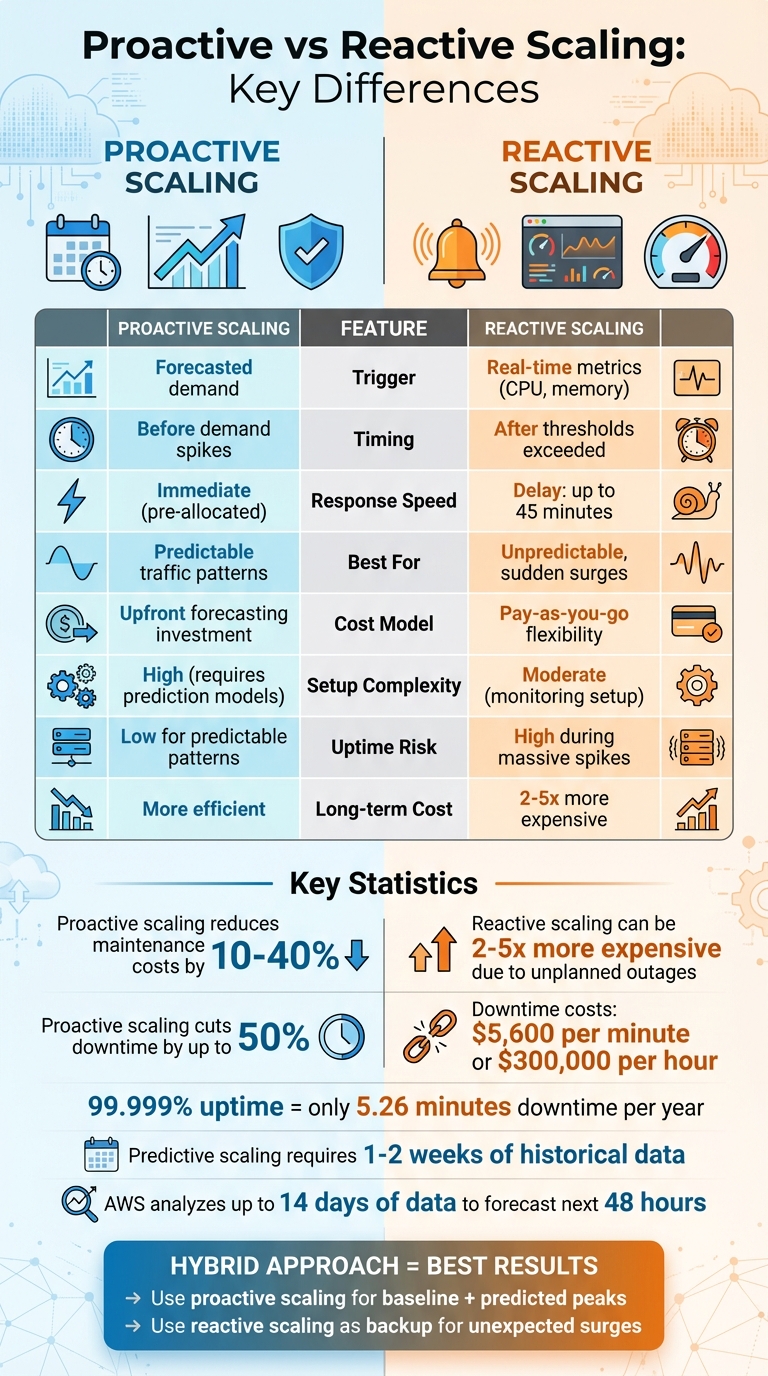
Proactive vs Reactive Scaling: Complete Comparison Guide
Proactive Scaling: Planning Ahead
How Proactive Scaling Works
Proactive scaling relies on analyzing historical load data to identify traffic patterns – whether daily, weekly, or seasonal. It prepares resources in advance based on these patterns, ensuring systems are ready before demand spikes. This approach typically falls into two categories: scheduled scaling, which uses fixed, time-based actions (like a cron job), and predictive scaling, which leverages machine learning to forecast demand. Predictive scaling typically requires at least 1–2 weeks of historical data to function effectively. The key distinction from reactive scaling is timing – resources are allocated before the increased load arrives.
This method pre-initializes resources to handle immediate demand while continuing to scale as needed. For applications with long startup times – like large ERP systems or complex web platforms – this preemptive approach is critical. It ensures consistent performance, setting the stage for the benefits outlined below.
Benefits of Proactive Scaling
By having resources ready ahead of demand, proactive scaling eliminates delays, ensuring steady performance and minimizing downtime. This leads to a smoother user experience, even during high-traffic periods.
Companies implementing proactive scaling often see a 10% to 40% reduction in maintenance costs compared to reactive methods. Additionally, proactive strategies can cut downtime by as much as 50%, a vital advantage for businesses focused on maintaining high availability. Unlike over-provisioning – keeping excess resources running "just in case" – this approach reduces infrastructure waste while still safeguarding uptime. Automation further minimizes the risks of manual errors and the labor-intensive nature of manual adjustments.
When to Use Proactive Scaling
Proactive scaling works best when workloads follow predictable patterns. For example, if your traffic consistently peaks during business hours and drops off at night, proactive scaling ensures capacity is ready ahead of time. It’s also well-suited for one-time events with historical data, like product launches, marketing campaigns, or seasonal surges such as Black Friday. Recurring tasks like batch processing, scheduled data analysis, or testing workloads with known schedules are also ideal candidates. The common thread is predictability – if you can forecast demand, proactive scaling is the way to go.
To avoid unexpected costs from inaccurate forecasts, always set a maximum limit on the number of resources that can be automatically allocated. Regularly monitor capacity and adjust thresholds as your application evolves. By planning ahead, proactive scaling not only improves performance but also ensures resources are used efficiently, keeping uptime high without unnecessary expense.
Reactive Scaling: Adapting in Real-Time
How Reactive Scaling Works
Reactive scaling keeps an eye on real-time metrics like CPU usage, memory, request rates, or queue depth. When these metrics pass predefined thresholds – say, CPU usage exceeds 70% for a specific duration – it triggers scaling actions. This could mean scaling out by adding more instances or scaling in by reducing capacity. To prevent constant adjustments, cooldown periods are used to stabilize the system between changes.
For example, some platforms can spin up new instances in just a few minutes, while others may take longer. These differences depend on the platform’s configuration and can directly impact how quickly your system responds to changes.
Benefits of Reactive Scaling
Reactive scaling shines when dealing with unexpected traffic spikes. It automatically adjusts resources to handle the load without requiring manual intervention, ensuring your service stays up and running. Plus, it’s efficient – resources are only added when needed, which helps cut down on unnecessary costs tied to idle capacity.
But, like any system, it’s not without its challenges.
Drawbacks of Reactive Scaling
One of the main challenges is provisioning delays. Spinning up new instances, especially for complex services, can take time. During this delay, your system might experience temporary slowdowns or even errors.
Another issue is the heavy reliance on accurate monitoring. If your metrics are misconfigured or thresholds are too narrow, you could end up with rapid scaling oscillations – scaling up and down erratically – which can destabilize your system. To avoid this, it’s smart to:
- Set clear margins between scale-out and scale-in thresholds.
- Keep a small buffer of extra capacity (e.g., operating at 75% utilization instead of maxing out at 100%).
- Design your application to be stateless, so any instance can handle requests without losing session data.
Use of Reactive and Proactive Elasticity to Adjust Resources Provisioning in the Cloud
sbb-itb-59e1987
Proactive vs Reactive Scaling: Main Differences
Let’s dive into the key distinctions between proactive and reactive scaling, building on the operational details we’ve explored earlier. Below, a table and analysis break down how these two strategies differ.
Comparison Table: Proactive vs Reactive Scaling
| Feature | Reactive Scaling | Proactive Scaling |
|---|---|---|
| Trigger | Real-time thresholds | Forecast data |
| Timing | After thresholds are exceeded | In advance of anticipated changes |
| Response Speed | Subject to resource provisioning lag | Near-instantaneous (resources already present) |
| Uptime Risk | High during sudden, massive spikes | Low for predictable patterns |
| Cost Impact | Optimizes elasticity; pay-as-you-go | Requires upfront forecasting investments |
| Setup Complexity | Moderate; relies on monitoring setup | High; requires accurate prediction models |
Timing and Response Speed
The most striking difference between proactive and reactive scaling lies in when resources are made available. Reactive scaling waits until thresholds – like 70% CPU usage – are hit before allocating additional resources. However, this approach comes with a drawback: some cloud services can take up to 45 minutes to complete scaling operations. This delay means resources might not be ready in time to handle sudden traffic spikes, potentially disrupting service during critical moments.
Proactive scaling takes a different approach. Resources are already allocated before demand spikes occur, eliminating any lag. For example, if you’re preparing for a product launch or know your peak traffic hours, proactive scaling ensures your system is fully equipped to handle the surge without delays.
Cost and Resource Usage
Resource allocation strategies also have a direct impact on costs and performance, which are crucial for maintaining uptime and efficiency.
Reactive scaling operates on a pay-as-you-go model, where resources are added only when needed. While this approach minimizes upfront expenses, it can lead to higher costs in the long run. According to the Marshall Institute, reactive scaling can be 2 to 5 times more expensive due to unplanned outages and the need for emergency fixes.
On the other hand, proactive scaling involves an upfront investment in forecasting and resource allocation. However, it often results in substantial savings over time by reducing downtime and avoiding both over-provisioning (wasting money) and under-provisioning (causing performance issues). For workloads with unpredictable traffic, reactive scaling offers better flexibility. But for workloads with consistent patterns, proactive scaling proves to be more cost-efficient in the long run.
Choosing the Right Scaling Strategy
Picking between proactive and reactive scaling isn’t always straightforward. The decision depends on factors like load predictability, application behavior, and business needs. Let’s dive into when each approach makes the most sense.
When to Use Proactive Scaling
Proactive scaling is ideal if your traffic patterns are predictable. For instance, if you know demand spikes during business hours or on Friday afternoons, this strategy allows you to prepare ahead of time.
It’s also a must for applications with long startup times. If your app takes several minutes to initialize, reactive scaling might leave users waiting – or worse, encountering errors – while new resources come online. By allocating resources in advance, you avoid these delays.
High Service Level Agreements (SLAs) are another reason to choose proactive scaling. If you promise 99.999% uptime (allowing just 5.26 minutes of downtime per year), waiting for reactive scaling to catch up isn’t an option. On the other hand, for workloads with a 99.9% uptime commitment (around 8.76 hours of annual downtime), reactive scaling may be sufficient.
When to Use Reactive Scaling
Reactive scaling shines in scenarios with unpredictable or volatile traffic. If you’re launching a product without historical traffic data, dealing with sudden social media buzz, or facing irregular news-driven spikes, reactive scaling ensures you only pay for resources when demand exceeds a set threshold, such as CPU or memory usage.
This approach is especially cost-efficient for bursty workloads triggered by unscheduled events. You avoid the expense of maintaining unused capacity during slow periods and can scale down quickly after a demand spike subsides.
However, reactive scaling works best with stateless applications. If your app relies on instance-specific data or long-running tasks, you’ll need a thoughtful design to ensure smooth shutdowns during scale-in operations. Additionally, keep an eye on downstream systems – scaling your web servers without considering database capacity could create bottlenecks.
For the best results, combining reactive policies with proactive strategies can balance cost and performance.
Using Both Strategies Together
The most efficient scaling often blends both approaches. Proactive scaling handles your expected baseline traffic and predicted peaks, while reactive scaling steps in as a backup for unexpected surges. This hybrid approach minimizes over-provisioning while maintaining reliability.
"The goal of cost optimizing scaling is to scale up and out at the last responsible moment and to scale down and in as soon as it’s practical." – Microsoft Azure Well-Architected Framework
For example, you could schedule proactive scaling for regular business hours while layering reactive policies to manage deviations from your forecast. AWS predictive scaling, for instance, analyzes up to 14 days of historical data to forecast demand for the next 48 hours, giving you a solid foundation. Reactive scaling then catches anything outside those predictions.
To prevent runaway costs during events like DDoS attacks or software glitches, always set a maximum limit on the number of instances that can be automatically added. Additionally, use the Throttling pattern to protect your system while new resources spin up during sudden bursts. Finally, avoid "flapping" (rapidly adding and removing resources) by setting enough margin between scale-out and scale-in thresholds.
Conclusion
Deciding between proactive and reactive scaling comes down to understanding your workload patterns and business goals. For workloads with predictable traffic patterns, proactive scaling ensures your systems are ready before demand surges, avoiding potential performance issues. On the other hand, reactive scaling is ideal for handling unexpected spikes, keeping costs manageable by adding resources only when necessary.
Consider the stakes: downtime can cost around $5,600 per minute, with losses climbing to $300,000 per hour. If you’re aiming for "five nines" (99.999%) uptime – equivalent to just 5.26 minutes of downtime per year – proactive measures are essential to stay ahead of demand and maintain reliability.
Many successful systems adopt a hybrid approach. Proactive scaling takes care of your baseline needs and anticipated peaks, while reactive scaling steps in as a backup for sudden, unforeseen demands. This combination strikes a balance between cost efficiency and reliability, especially when your applications are designed for stateless operation, allowing seamless scaling.
Once your scaling strategy is set, the infrastructure you choose becomes critical. Serverion’s hosting solutions provide a solid foundation for both proactive and reactive scaling. With globally distributed infrastructure, 24/7 support, and built-in DDoS protection, you can implement automated scaling with confidence, freeing you to fine-tune your policies rather than worry about the underlying systems.
FAQs
What are the advantages of combining proactive and reactive scaling strategies?
Combining proactive and reactive scaling creates a smart balance for managing traffic demands. Proactive scaling relies on predictive tools to anticipate traffic increases, allowing you to prepare in advance, minimize wasted resources, and control costs. Meanwhile, reactive scaling steps in to handle unexpected traffic spikes, ensuring your systems stay stable and responsive when sudden surges occur.
When these two strategies work together, you can avoid the pitfalls of over-provisioning (which drains your budget) while also steering clear of under-provisioning (which could lead to downtime). This balanced approach not only makes better use of resources but also keeps your systems performing reliably. For Serverion customers, this hybrid method is built right into the platform’s auto-scaling tools, helping your applications remain fast, economical, and dependable – even during unpredictable traffic swings.
What’s the difference between predictive scaling and scheduled scaling in proactive strategies?
Predictive scaling leverages historical data and machine learning to forecast future demand, adjusting resources automatically before the need arises. On the other hand, scheduled scaling works on a fixed schedule, increasing or decreasing capacity based on specific, pre-determined dates and times.
While both methods take a proactive approach, predictive scaling offers a more flexible and responsive solution. Scheduled scaling, however, shines in scenarios with consistent, predictable workloads or regular events.
What are the main challenges of using reactive scaling?
Reactive scaling comes with its fair share of challenges, affecting both performance and expenses. One major hurdle is the time lag between identifying a traffic surge and deploying extra resources. This delay often results in temporary slowdowns or even service outages, as scaling only kicks in once demand has already exceeded predefined limits. The situation can worsen if the process involves manual adjustments or intricate calculations.
Another tricky aspect is determining the right monitoring metrics and thresholds. If thresholds are set too low, you might end up with unnecessary scaling actions, wasting resources and driving up costs. On the flip side, setting them too high risks under-provisioning, which can hurt the user experience. Reactive scaling also leans heavily on reliable health checks and alert systems. Any flaws or gaps in these systems can slow down responses to sudden increases in demand.
Lastly, reactive scaling can lead to unpredictable costs, as unexpected traffic spikes might result in higher-than-anticipated expenses. To tackle these issues, Serverion offers automated monitoring, robust health checks, and flexible scaling policies, helping ensure quicker responses and more efficient resource management.







