

How to Automate Third-Party Security Assessments

Automating third-party security assessments saves time, reduces costs, and minimizes risks associated with vendor relationships. Here’s why it matters:
- 62% of network intrusions come from vendor-related breaches.
- Manual processes consume 15,000+ hours annually and add $370,000 to breach costs.
- Automated tools deliver 91% accuracy, reduce audit times by 70%, and cut compliance costs by 40%.
Switching to automation transforms vendor risk management by providing faster assessments (24–48 hours), real-time monitoring, and continuous oversight. It ensures compliance with regulatory standards (like GDPR, HIPAA, or SOC 2) while improving security outcomes.
To get started, you need structured vendor data, risk-based classifications, and the right automation platform with features like AI-powered questionnaires, evidence collection, and monitoring. A secure hosting solution is critical to support these tools and ensure scalability.
Automation isn’t just efficiency – it’s a smarter way to safeguard your business.
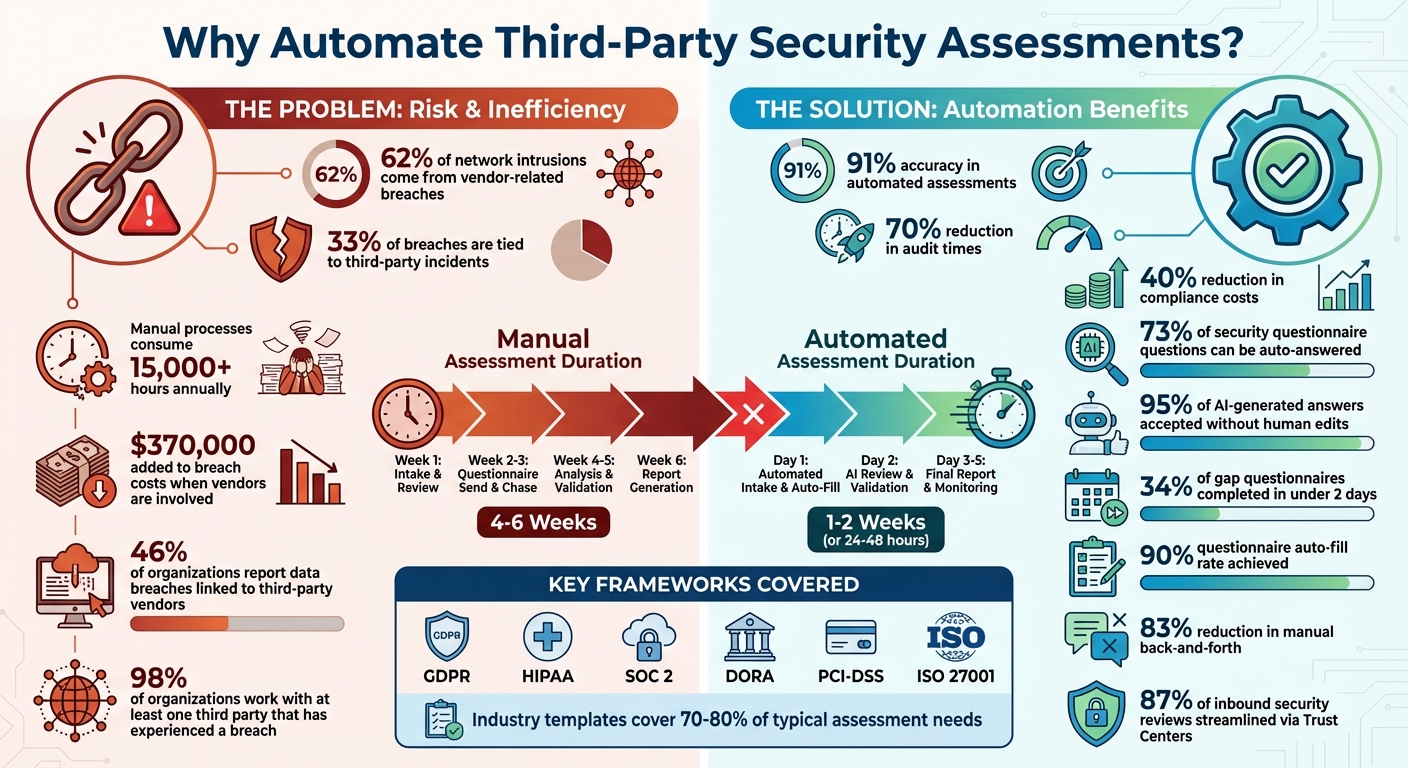
Third-Party Security Assessment Automation: Key Statistics and Benefits
How to Use AI in Third-Party Risk Management
sbb-itb-59e1987
Preparing for Automation: Steps Before You Start
Jumping into automation without preparation can lead to chaos – disorganized data, inconsistent evaluations, and wasted time. The key is to create a structured foundation that sets the stage for automation to work effectively. Once that groundwork is in place, focus on organizing vendors and ensuring compliance requirements are aligned.
Classify Vendors by Risk Level
Not all vendors pose the same level of risk. For example, a payment processor handling sensitive credit card data needs far more scrutiny than a vendor supplying office furniture. By categorizing vendors into risk tiers, you can prioritize your efforts where they’re needed most.
Start by gathering vendor details during onboarding. Ask questions about how the vendor will be used, what data they’ll handle, and which systems they’ll access. Based on their responses, you can automatically assign a risk tier using logic-based rules. For instance, if a vendor accesses personally identifiable information (PII) or protected health information (PHI), they might be placed in Tier 1, triggering a more thorough review process.
Tag vendors with attributes that define their data usage and system access. This makes it easier to tailor your assessments – high-risk vendors get detailed questionnaires aligned with frameworks like NIST CSF or ISO 27001, while low-risk vendors undergo lighter reviews. You can also run a domain scan to establish a baseline security rating and flag any early warning signs.
| Classification Step | Action Required | Automation Benefit |
|---|---|---|
| Onboarding | Collect vendor details | Activates tiering logic |
| Tiering | Assign a risk level (Tier 1-4) | Determines depth of review |
| Scoping | Identify data types (e.g., PII, PHI) | Matches controls to regulations |
| Monitoring | Establish security baseline | Alerts on changes in posture |
Review Regulatory and Compliance Requirements
Automation needs to align with key regulatory frameworks to avoid costly mistakes later. Whether it’s GDPR, HIPAA, SOC 2, or DORA, each framework comes with specific controls and documentation requirements.
Map vendor risks to the appropriate control domains, such as Security, Availability, Confidentiality, Processing Integrity, or Privacy. For example, A Tier 1 virtual private server provider might need a SOC 2 Type II report covering Security, Availability, and Confidentiality, along with proof of data encryption and uptime SLAs. A Tier 2 help-desk tool, on the other hand, might only need a SOC 2 Type I report and verification of API access controls.
"The U.S. Federal Reserve warned banks in 2024 that outsourcing services does not relieve them of responsibility for compliance." – Konfirmity
Leverage industry-standard questionnaires like PCI-DSS, SIG, or CAIQ to cover 70–80% of typical assessment needs. These templates offer a solid starting point and ensure you’re meeting recognized standards. Configure your automation system to request updated SOC 2 reports and insurance certificates based on contract anniversaries and risk tier. By integrating compliance checks into procurement workflows, you can catch issues before contracts are signed.
Consolidate Vendor Data and Documentation
A centralized knowledge base is a must-have. If your vendor records, security policies, and certifications are scattered across emails, spreadsheets, and cloud folders, automation won’t work. Consolidation ensures your system can scale without collapsing under disorganization.
Build a response library with pre-approved answers categorized by topics like GDPR or SOC 2. This can handle around 73% of questions in security questionnaires, and 95% of AI-generated answers from centralized data are accepted without human edits.
"Ideally, you should be able to access and monitor all VRAs through a centralized inventory, as vendor tracking through spreadsheets and disparate systems isn’t efficient." – Vanta
Make sure version control is in place so only the latest, approved documents are used. Assign ownership for each document and review the repository quarterly to keep it up-to-date. When evidence is pre-sourced and centralized, vendors complete 34% of gap questionnaires in under two days. By eliminating spreadsheets and email chains, you reduce silos and streamline communication.
Choosing the Right Automation Tools
Once you’ve got the basics in place, the next step is picking the right platform to handle your assessment automation. The right tool can save you a ton of time and cut down on those endless back-and-forths with vendors.
Features to Look for in Automation Tools
Start by focusing on AI-powered questionnaire management. The top platforms use AI to auto-fill vendor responses by linking questions to a centralized knowledge base of pre-approved answers. Why does this matter? Because 73% of the questions in security questionnaires can often be answered using your existing documentation. Tools that include Natural Language Processing (NLP) are especially helpful – they can interpret questions phrased differently and match them to one consistent source.
Next, look for pre-built template libraries. These should include industry-standard frameworks like SIG, CAIQ, NIST, ISO 27001, and SOC 2. These templates can cover up to 70–80% of common assessment needs, reducing the repetitive workload for vendors who often face the same questions from multiple clients. Plus, when paired with AI-powered autofill, vendors can achieve a 90% submission rate, speeding up the entire process.
Another key feature is continuous security monitoring. The best tools don’t just stop at one-time assessments – they provide real-time alerts for vulnerabilities, breach notifications, and updates to a vendor’s security rating. With 62% of network breaches originating from third-party partners, this kind of monitoring is essential. To make it even more robust, integrate cybersecurity ratings from services like Bitsight or SecurityScorecard. These ratings can validate vendor-provided answers with independent, objective data.
Don’t overlook automated evidence collection. A good platform should automatically gather supporting documents – like SOC 2 reports – and flag any incomplete or inconsistent responses. This ensures that every answer is backed by solid evidence, cutting down on the need for manual follow-ups. Integrated remediation workflows are another plus, enabling you to assign tasks, track progress, and collaborate with vendors seamlessly.
Finally, consider tools that offer Trust Centers. These self-service portals allow vendors to proactively share their security profiles, reducing the need for repetitive questionnaires. In fact, these portals can streamline up to 87% of inbound security reviews. Features like automated NDA management – using tools like DocuSign – can also simplify the process by securing digital signatures before sensitive documents are shared.
| Feature | Why It Matters | Impact |
|---|---|---|
| AI-Powered Autofill | Maps questions to pre-approved answers | 95% acceptance rate without edits |
| Pre-Built Templates | Standardizes assessments across vendors | Covers 70–80% of core needs |
| Continuous Monitoring | Tracks real-time security changes | Catches risks between annual reviews |
| Evidence Collection | Validates responses with documentation | Reduces manual follow-up efforts |
| Trust Centers | Enables vendor self-service | Streamlines 87% of inbound reviews |
Once you’ve chosen an automation tool, make sure it’s backed by a hosting solution that can handle your growing needs.
Ensuring Scalability and Security in Hosting
To keep your automation platform running smoothly as your vendor base grows, you’ll need a reliable hosting setup. Continuous monitoring, in particular, requires hosting that’s both scalable and secure. This is where partnering with a provider like Serverion can make a difference. They offer dedicated servers, virtual private servers (VPS), and AI GPU servers designed to deliver the compute power and storage you’ll need to scale effectively.
Security is just as important as scalability. Automation platforms store sensitive vendor data, so you need infrastructure that includes SSL certificates for encrypted data transmission and DDoS protection to ensure uninterrupted access. Serverion’s global data centers also help ensure low latency and high performance, no matter where your vendors are located.
As your vendor network grows, scalability challenges can arise. Serverion’s colocation services and server management let you expand your infrastructure without the hassle of maintaining physical hardware. This means your platform can handle thousands of vendors while maintaining high uptime and security. If you’re running custom automation scripts or integrating multiple tools, Serverion’s VPS and dedicated server options allow you to configure your environment to meet your exact needs.
How to Implement Automation: Step-by-Step
With your platform and remote server management ready to go, you can implement automation in three key phases. Using your chosen tools and structured data, follow these steps to bring automation into action.
Start Assessments with Pre-Built Templates
Begin by selecting templates from your platform’s library, such as SIG, CAIQ, ISO 27001, NIST CSF, or HECVAT. Each framework has a specific focus. For instance, CAIQ v4.0.2 includes 261 questions targeting cloud security, making it a strong choice for SaaS providers.
Tailor these templates based on vendor risk levels. For lower-risk vendors, use a "Lite" version like CAIQ-Lite, which has 124 questions, while higher-risk vendors managing sensitive data should undergo more detailed assessments covering all 21 control areas. Set "preferred answers" within templates to automatically flag responses that don’t meet your security standards. Link these templates to your centralized knowledge base using tags like product type, region, or industry. This step builds on the vendor data consolidation you’ve already set up, making the process more efficient.
Once templates are ready, automate the distribution of questionnaires to speed up evidence collection and cut down on manual follow-ups.
Automate Questionnaire Distribution and Evidence Collection
With templates configured, set up scheduling rules to automate questionnaire distribution. For example, you can program the system to send questionnaires 30 days before a vendor’s annual review date. AI features can scan your internal documentation and past responses to auto-fill as much as 90% of the questionnaire fields. This reduces response times dramatically – from days to just a few hours.
Integrate your platform with tools like cloud environments, identity providers, and task management systems to pull live evidence, such as encryption settings or access logs. This eliminates the need for manual uploads and ensures the evidence stays up-to-date. Use rule-based reminders to nudge vendors every five days until all documentation is submitted. The AI can even analyze complex documents like SOC 2 reports, extracting critical security data and verifying vendor claims. This streamlines the process, cutting manual back-and-forth by 83%.
Calculate Risk Scores and Enable Continuous Monitoring
Once responses and evidence are collected, calculate risk scores by multiplying the likelihood of a risk by its impact (Risk Score = Likelihood × Impact). Use a simple 1–3 scale for both factors, and group the final scores into Low (1–3), Medium (4–5), and High (6–9) risk levels. To refine the composite score, give extra weight to critical factors like financial impact or data privacy concerns.
Set up continuous monitoring to keep an eye on vendor security ratings in real time. Alerts can notify your team immediately if a vendor’s rating drops or if a new vulnerability is discovered. This shifts your approach from periodic assessments to ongoing oversight, which is crucial given that 62% of network intrusions stem from third-party partners. Incorporate threat intelligence feeds to identify emerging risks that static questionnaires might miss. Additionally, map vendor responses to regulatory frameworks like GDPR, HIPAA, or SOC 2 to simplify compliance reporting during audits.
Using Serverion Hosting Solutions for Automation
Your automation platform needs a solid foundation to handle sensitive vendor data and ensure uninterrupted operations. With 46% of organizations reporting data breaches linked to third-party vendors, the infrastructure supporting your assessment tools plays a direct role in your security measures. Serverion’s hosting solutions are designed to deliver the performance, security, and reliability essential for managing third-party risks effectively.
Setting Up Secure and Scalable Hosting with Serverion
Switching to secure portals on Serverion’s hosting eliminates the risks of email-based evidence collection. With Serverion’s SSL certificates, sensitive files like SOC 2 reports and penetration test results can be transferred securely through encrypted channels. This is especially important when 70% of breaches are caused by giving third parties excessive access. By creating a secure hosting environment, you strengthen the reliability of your automation tools.
For organizations managing large vendor inventories, Serverion’s VPS and dedicated servers offer dynamic scalability to handle varying workloads. Their flexible plans accommodate everything from low-risk vendor assessments to the resource-heavy evaluations required for Tier 1 vendors with access to critical systems. Centralize all vendor-related documents, security policies, and compliance certificates in a single, audited repository on dedicated server storage. This ensures strict data isolation and controlled access.
However, even the most secure and scalable hosting environment must guarantee constant availability to be fully effective.
Using DDoS Protection for Continuous Availability
Uninterrupted access is crucial for ongoing assessments, especially during vendor onboarding or contract renewals. Serverion’s DDoS protection minimizes the risk of downtime caused by cyberattacks, ensuring your platform remains operational. Considering that 55% of organizations face supply chain disruptions due to cybersecurity issues, maintaining uptime is critical.
This protection enables real-time risk feeds and alerts, so your team is immediately informed when a vendor’s security rating drops or a new vulnerability arises. By supporting continuous oversight rather than periodic assessments, Serverion’s global data centers keep your third-party risk program running around the clock. A robust hosting solution like this is essential for sustaining automated vendor assessments and real-time risk monitoring.
Monitoring, Reporting, and Improving Your System
Once your automated assessment workflows are up and running, the next step is keeping them fine-tuned and effective. Regular monitoring ensures your system stays aligned with changes in vendor relationships and evolving risks. By combining automated data collection with risk scoring, you can set up real-time alerts to address potential issues as they arise.
Configure Rule-Based Alerts and Real-Time Reporting
Rule-based alerts are a game changer. These alerts activate the moment risk levels shift, using criteria like SeverityLabel (CRITICAL, HIGH), ComplianceStatus (FAILED), or WorkflowStatus (NEW). For example, if a vendor’s security rating drops or a certification expires, your team gets notified immediately.
Automated remediation workflows can take it from there by creating tickets in IT service management tools or triggering external actions. This event-driven approach eliminates the need for outdated, calendar-based audits, offering continuous oversight that reacts to actual changes in security posture.
Real-time dashboards further enhance visibility, giving security, legal, and procurement teams instant updates without manual input. These dashboards track essential metrics like average turnaround times, how often questions are auto-filled from your response library, and vendor clarification request rates. With automation, assessment times can shrink dramatically – from 30–45 days down to fewer than 10.
Collect Feedback and Refine Workflows
Once your alerts and reporting systems are humming along, it’s important to keep refining them. Regular feedback from users helps identify areas for improvement. For instance, procurement teams can highlight bottlenecks in vendor onboarding, while legal teams can ensure AI-generated responses align with regulatory requirements. Pay close attention to clarification request rates – if vendors repeatedly ask for clarification on certain questions, it’s a sign those questions might need clearer wording.
Keep your centralized response library up to date by reviewing it quarterly. Assign ownership to specific categories, and update responses based on the latest security protocols, audit findings, and penetration tests.
"Vanta users found that 95% of AI-generated questionnaire answers are accepted without human refinement, underscoring the need to maintain current, high-quality source data."
Measure your automation’s impact by tracking the percentage of questions answered automatically versus those requiring manual input. This data helps calculate your return on investment (ROI) and highlights areas where your knowledge base can grow. Use built-in commenting features in your vendor risk management platform to gather stakeholder feedback directly on questionnaire responses, keeping all relevant information in one place.
"With 80% of legal and compliance leaders reporting that third-party risks were identified after initial onboarding and due diligence, continuous feedback loops are critical for catching gaps before they turn into breaches."
Conclusion
Automating third-party security assessments isn’t just about speeding up processes – it’s about turning vendor risk management into a competitive advantage. With nearly 33% of breaches tied to third-party incidents and extra costs averaging $370,000 when vendors are involved, manual methods simply can’t keep up with the increasing complexity of today’s threats.
By shifting from periodic reviews to continuous monitoring, organizations can address risks as they arise. Automation slashes assessment timelines from 4–6 weeks to just 1–2 weeks, while standardized workflows bring consistency to managing hundreds – or even thousands – of vendor relationships. Considering that 98% of organizations work with at least one third party that has experienced a breach, this level of efficiency and visibility is no longer optional. To achieve these results, however, a strong and reliable hosting infrastructure plays a key role.
"Automation transforms third-party risk management from a bottleneck into a business enabler." – Spog.ai
Automation enhances vendor risk management, but its effectiveness depends on secure and scalable hosting. Automated platforms need robust hosting to protect sensitive data, such as SOC 2 reports and penetration test results. Serverion’s hosting solutions provide the security and reliability essential for continuous monitoring, including DDoS protection to keep risk alerts functioning even during potential disruptions. When handling thousands of assessments, scalable hosting ensures smooth performance without compromising on speed or reliability.
FAQs
Which vendors should I automate assessments for first?
Start by evaluating vendors that present the greatest cybersecurity risks or play a crucial role in your operations. Pay particular attention to those managing sensitive information, providing essential services, or operating within heavily regulated industries. Vendors with a track record of security issues or extensive supply chain involvement should also be high on your list. Using automation to conduct these assessments can streamline onboarding, enhance security measures, and reinforce your third-party network.
How do I connect automation to my compliance requirements?
To align automation with compliance requirements, adopt compliance as code practices. This approach automates key tasks like monitoring, validation, and reporting, enabling real-time detection of issues, prompt remediation, and efficient evidence collection. By reducing reliance on manual processes, you minimize the risk of human error. Incorporating compliance checks into automated workflows ensures that your operations stay aligned with regulations, maintain accuracy, and simplify audits. This seamless integration keeps your compliance efforts current while helping you meet industry standards more effectively.
What data should my vendor portal store, and how do I secure it?
Your vendor portal needs to house key security-related data essential for third-party risk assessments. This includes vendor security policies, details about technical controls, their compliance status, and risk management practices. Additionally, it should store responses to security questionnaires that address critical areas like data protection, encryption methods, and access control measures.
To keep this data safe, implement strong access controls, utilize encryption, and conduct regular audits. Focusing on both confidentiality and integrity is crucial to protect this sensitive information from breaches or unauthorized access.







